Monday.com

Pros
- Easy-to-use visual interface with minimal learning curve.
- Highly customizable for solar EPC and renewable energy workflows.
- Strong automation capabilities reduce repetitive administrative work.
- Excellent mobile applications for field teams.
- Map views support geographic solar site tracking.
- Scales from small solar installers to utility-scale developers.
- Reliable support for paid enterprise users.
Cons
- Paid plans require a minimum number of seats.
- Advanced functionality is locked behind higher-tier plans.
- Automation limits apply on smaller subscriptions.
- Not a replacement for advanced GIS analysis software.
- Costs can increase significantly for large teams and enterprise features.
Solar Engineering, Procurement, and Construction (EPC) companies manage highly complex project lifecycles involving site selection, GIS coordination, permitting, engineering, and construction management. Keeping field teams, designers, and project managers aligned across multiple active projects can quickly become difficult when information is scattered across spreadsheets, emails, and disconnected tools.
monday.com solves this challenge by providing a flexible cloud-based workspace where solar teams can centralize workflows, automate repetitive tasks, and track projects visually. Its highly customizable structure makes it particularly useful for solar developers and EPCs managing large pipelines of renewable energy projects.
What Is monday.com?
monday.com is a cloud-based Work Operating System (Work OS) that allows organizations to build custom workflows, project tracking systems, and operational dashboards without coding.
For solar EPCs and renewable energy developers, the platform is commonly used to manage land acquisition pipelines, GIS coordination, permitting processes, construction schedules, and team collaboration through customizable boards and automation tools.
Features
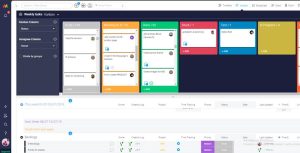
- Visual Board System: Track solar project stages using color-coded workflows and statuses.
- Customizable Columns: Store GIS coordinates, irradiance data, permits, and engineering details.
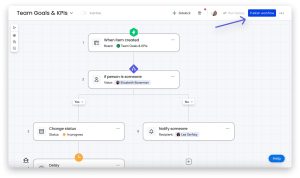
- Automation Recipes: Automate notifications, task assignments, and workflow transitions.
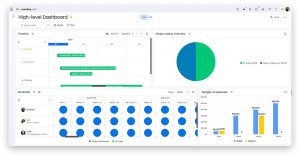
- Multiple Project Views: Switch between Kanban, Gantt, Calendar, Timeline, and Map views.
- Document Management: Attach permits, surveys, GIS exports, and utility agreements to projects.
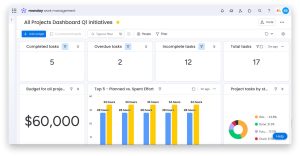
- Dashboards and Reporting: Consolidate project KPIs and portfolio analytics.
- Time Tracking: Monitor engineering and field team hours directly inside workflows.
Screenshots
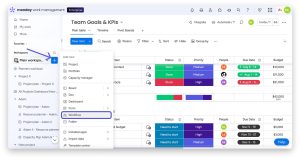
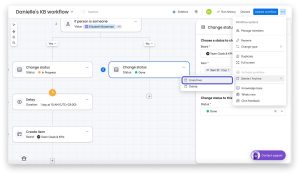
monday.com Pricing
monday.com uses a tiered subscription model based on features and the number of users.
- Free Plan: Available for up to two users with limited functionality.
- Basic Plan: Starts around $9 per seat/month billed annually.
- Standard Plan: Starts around $12 per seat/month and includes Timeline, Gantt, and Map views.
- Pro Plan: Starts around $19 per seat/month with advanced automations and time tracking.
- Enterprise Plan: Custom pricing for large organizations requiring advanced security and reporting.
- AI Features: AI-powered tools are included with usage limits depending on the subscription tier.
Integrations
monday.com integrates with more than 200 third-party tools and enterprise platforms.
- GIS and Mapping: ArcGIS and Google Maps integrations.
- CRM Platforms: Salesforce, HubSpot, and Pipedrive.
- Communication Tools: Slack, Microsoft Teams, and Zoom.
- File Storage: Google Drive, Dropbox, and OneDrive.
- Productivity Tools: Gmail, Outlook, and Google Calendar.
- Developer Platforms: GitHub and Jira integrations.
- Automation Platforms: Zapier and Make for custom workflow automation.
How to Set Up monday.com
- Create a monday.com account and configure your workspace.
- Select a project management template or build custom boards.
- Create columns for solar-specific data such as Site ID, GPS coordinates, and permitting status.
- Invite engineering, GIS, permitting, and field teams.
- Configure automations for approvals, notifications, and project progression.
- Integrate communication and storage platforms such as Slack or Google Drive.
How to Use monday.com
Solar EPC teams typically begin by creating items for each prospective project site. Field technicians can upload photos, surveys, and GIS data directly from mobile devices while managers track project progression through visual dashboards.
As projects move through development stages, automations update statuses, notify stakeholders, and synchronize workflows across engineering, permitting, procurement, and construction teams. Managers can then use dashboards to monitor pipeline progress, budgets, and operational bottlenecks.
What You Can Manage with monday.com
- Site Selection Pipelines: Track land acquisition and feasibility studies.
- GIS and Mapping Workflows: Organize geographic project data.
- Permitting Processes: Monitor applications and approvals.
- Construction Scheduling: Manage timelines and project milestones.
- Resource Planning: Allocate engineering and field teams efficiently.
- Inventory Tracking: Monitor solar equipment and component availability.
- Client Communication: Share project updates and status reports.
FAQs
What does monday.com do?
monday.com is a visual work management platform that helps organizations manage projects, automate workflows, and collaborate across teams in real time.
Who is monday.com best for?
It is ideal for solar EPCs, renewable energy developers, project managers, and field operations teams managing complex project pipelines.
Is monday.com free?
Yes, monday.com offers a free plan for up to two users, though most growing renewable energy teams use paid tiers for advanced views and automations.
What are the main limitations of monday.com?
Main limitations include pricing growth for large teams, automation restrictions on smaller plans, and limited native GIS analysis capabilities.
What are the best alternatives to monday.com?
Popular alternatives include Asana, ClickUp, Sitetracker, Solar Ladder, and other renewable energy project management platforms.