 1 / 7
1 / 7
Pros and Cons
Pros
- Provides features developed specifically for solar design and layout workflows.
- Reduces manual drafting during early design iterations.
- Creates useful visual materials for technical sales presentations.
- Keeps multiple spatial layout iterations organized in one workspace.
- Makes it easier to define rooftop and ground-level obstruction zones.
Cons
- Lack of public pricing makes quick cost comparisons difficult.
- Limited information is available about third-party integrations.
- Teams moving from general-purpose CAD software may face an initial learning curve.
- Public documentation and self-service support resources appear limited.
Success in the solar industry depends heavily on precision. Turning raw GPS coordinates and satellite imagery into high-yield engineering blueprints can be challenging. Solar engineering firms, developers, and installers therefore rely on specialized software to reduce manual drafting errors, lower upfront costs, and move projects forward faster.
Site Studio addresses these challenges by automating early-stage engineering and design validation for residential and commercial solar projects. This allows design teams to spend less time on repetitive drafting and more time developing projects and supporting customers.
What Is Site Studio?
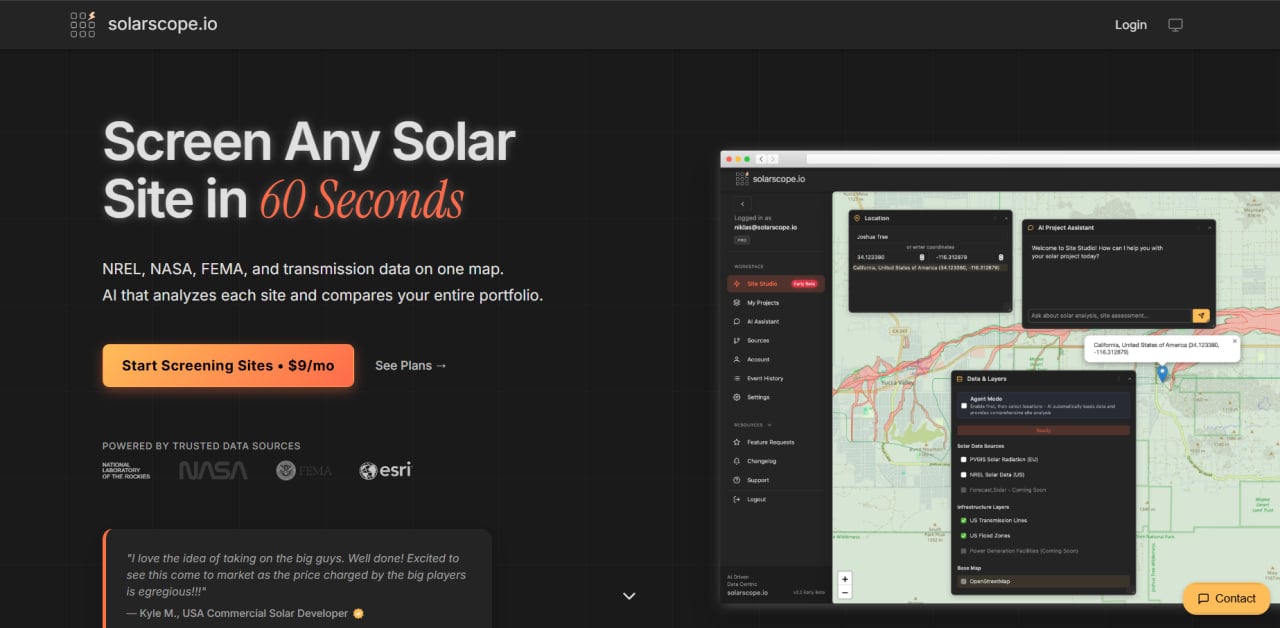
Site Studio is a specialized solar design and engineering tool created to support photovoltaic layout planning and project mapping. It provides a visual workspace where engineers can position equipment configurations within specific site boundaries.
Teams can use the platform to evaluate limited installation areas, account for physical obstructions, and finalize module layouts before ordering equipment. By transferring repetitive engineering tasks into a digital environment, Site Studio helps connect initial site assessments with practical field layouts.
Public information about the platform remains limited, and verified user statistics, industry awards, and detailed company milestones are not currently available.
Features
- Solar layout generation: Allows designers to place photovoltaic modules across rooftops or open ground while optimizing available space and panel density.
- Shading analysis: Identifies structural and environmental obstructions that may cast shadows across the proposed array.
- Site modeling: Creates digital project workspaces by mapping architectural outlines and physical site characteristics over aerial imagery.
- Asset configuration: Defines component boundaries, alignment paths, and equipment dimensions to represent real-world installation conditions.
Site Studio Pricing
Site Studio does not publish its pricing. Interested users need to contact the provider or request a product demonstration to receive a customized quote.
Public information about free trials, subscription levels, per-user fees, and enterprise packages is also unavailable.
Integrations
Public information about Site Studio integrations is limited. Organizations should contact the provider to confirm compatibility with their existing CRM, CAD, engineering, procurement, or project management tools.
Teams that require API access or specific export formats should verify these capabilities before choosing the platform.
How to Set Up Site Studio
- Contact the provider to request a demonstration and create an account.
- Log in to the web interface using the supplied administrative credentials.
- Complete the company profile and configure the team’s engineering preferences.
- Enter the geographic coordinates or upload reference imagery for the first project site.
- Create component templates that correspond to the modules and equipment used by the company.
How to Use Site Studio
A typical workflow begins by creating a project and entering the target address or geographic coordinates. The platform then displays the relevant site or map boundaries for the proposed installation.
The designer outlines available installation areas and marks obstructions such as chimneys, trees, roof equipment, setbacks, or structural barriers. This establishes the usable space available for photovoltaic modules.
Modules can then be positioned within the defined boundaries, with their orientation and spacing adjusted to compare different configurations. After selecting the preferred layout, the designer reviews the module count and spacing before sharing or exporting the layout for estimation, procurement, or further engineering work.
What You Can Manage with Site Studio
- Spatial layouts: Visual module placement plans for residential and commercial solar installations.
- Site boundary records: Digital property outlines containing mapped restrictions and obstruction zones.
- System layout iterations: Alternative designs used to compare module configurations, orientations, and spacing.
- Component counts: Preliminary module totals used to prepare early bills of materials and cost estimates.
FAQs
What does Site Studio do?
Site Studio is a solar design platform that helps professionals map site boundaries, identify physical constraints, and organize photovoltaic module layouts before construction begins.
Who is Site Studio best for?
The platform is intended for solar engineers, project designers, installers, and development teams that need a specialized tool for planning residential or commercial photovoltaic layouts.
Is Site Studio free?
The provider does not publicly disclose whether Site Studio offers a free plan or trial. Prospective users should contact the company for current pricing and demonstration options.
What are the main limitations of Site Studio?
The main limitations are the absence of public pricing, limited technical documentation, and a lack of detailed information about third-party integrations and API connectivity.
What are the best alternatives to Site Studio?
Common alternatives include Aurora Solar, OpenSolar, HelioScope, Arka360, and Solargraf.