
Web Solar Cloud
Pros
- Cloud-based platform accessible from any device.
- Fast project creation and design workflow.
- Integrated energy simulation and shading analysis.
- Automatic permit package generation.
- Supports drone-based site modeling.
- Built-in electrical and structural calculations.
- Easy-to-use interface compared to traditional CAD software.
- Professional proposal and reporting tools.
Cons
- Advanced features may be expensive for small teams.
- Best results require high-quality site imagery or drone scans.
- Limited public documentation regarding API capabilities.
- Some advanced engineering functions may require additional training.
- Regional compliance settings may require manual adjustments outside supported standards.
What Is Web Solar Cloud?
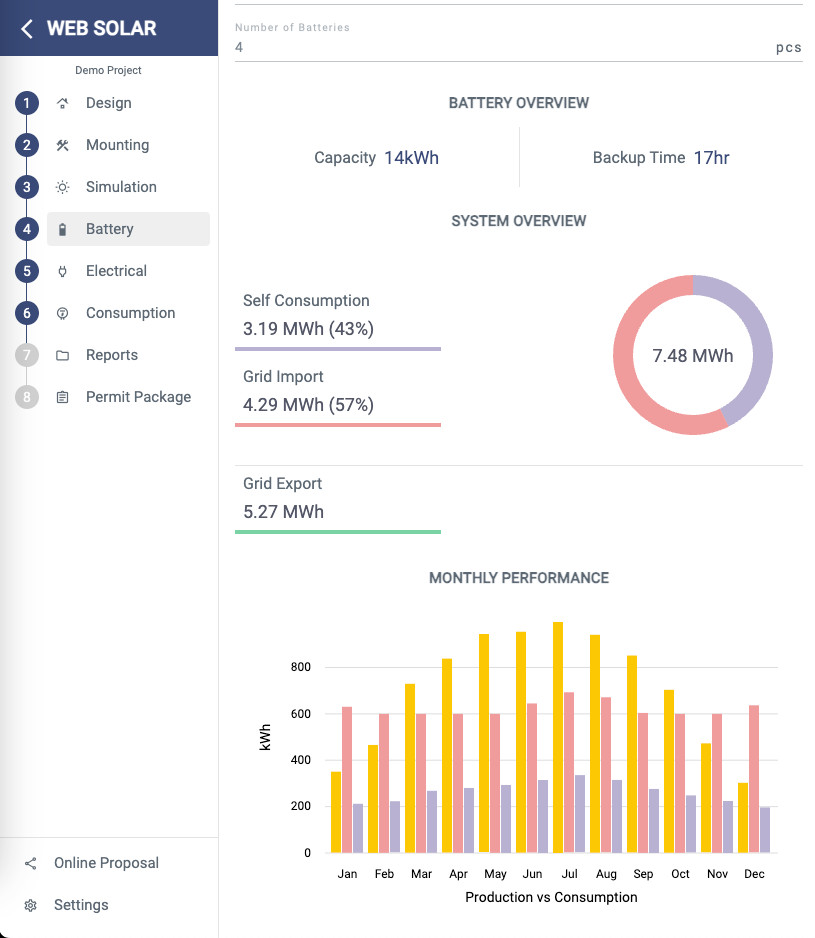
Web Solar Cloud is a cloud-based solar design and engineering platform developed for solar installers, EPC contractors, engineering firms, and renewable energy professionals. The software combines 3D modeling, energy simulation, electrical design, and permit package generation into a single web-based environment.
The platform allows users to create accurate solar layouts using satellite imagery, drone surveys, and site measurements. By automating design calculations, documentation, and compliance reporting, Web Solar Cloud helps teams reduce engineering time while maintaining design accuracy for residential, commercial, and utility-scale solar projects.
Features
- 3D Site Modeling: Create detailed rooftop and ground-mounted solar layouts using satellite maps, drone imagery, and custom measurements.
- Shading Analysis: Simulate annual shading impacts from trees, buildings, chimneys, and other obstructions.
- Energy Production Simulation: Generate estimated monthly and annual energy yield reports.
- Automatic Electrical Sizing: Automatically calculate PV strings, inverter sizing, and voltage compliance.
- Structural Engineering Calculations: Evaluate wind and snow loads based on applicable structural standards.
- Drone Data Integration: Import Pix4D and OpenDroneMap datasets for highly accurate 3D project modeling.
- Single Line Diagram (SLD) Generation: Automatically create electrical diagrams and system schematics.
- Permit Package Automation: Generate permit-ready engineering reports, drawings, and compliance documentation.
- Branded Proposal Generation: Create customer-facing proposals with production estimates, financial analysis, and 3D visualizations.
Screenshots
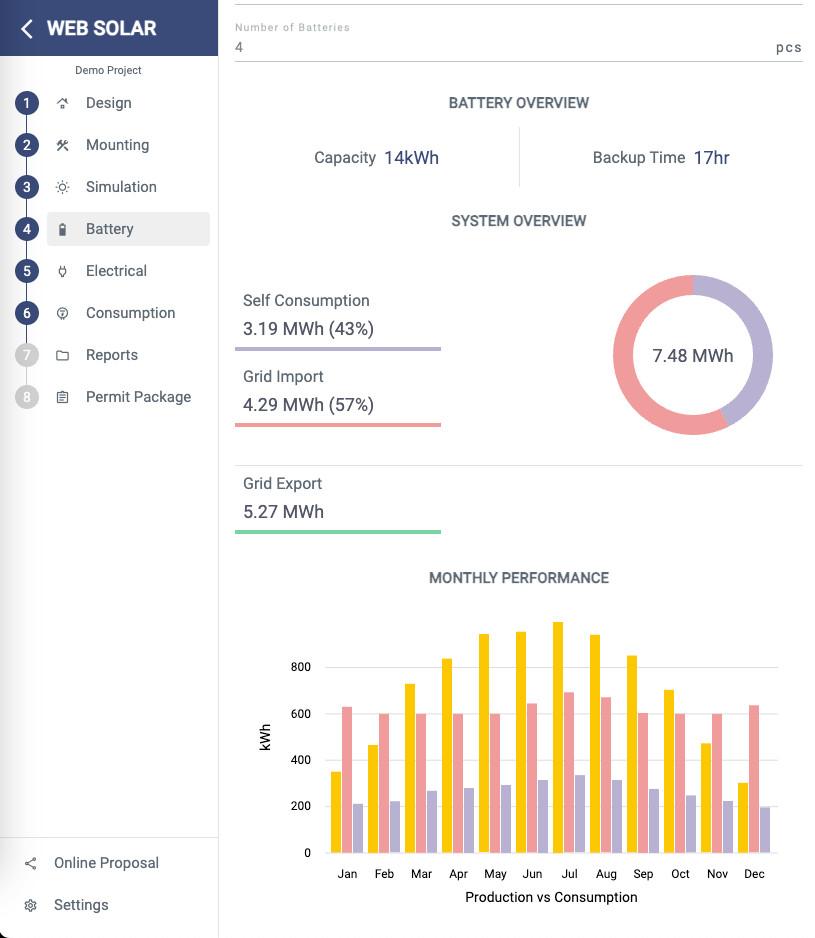
Web Solar Cloud Pricing
Web Solar Cloud offers subscription-based pricing designed for solar professionals and engineering teams.
- Free Trial: 15-day trial with access to premium functionality.
- Standard Subscription: Monthly plans typically range from approximately $20 to $250 depending on features and region.
- Project-Based Plans: Some pricing options may vary based on project volume or user count.
- Enterprise Plans: Custom pricing is available for large organizations requiring advanced integrations or API access.
- Annual Discounts: Reduced pricing may be available for annual subscriptions.
Integrations
- Google Maps: Satellite imagery and site selection.
- Pix4D: Drone mapping and photogrammetry integration.
- OpenDroneMap: Import high-resolution drone-generated models.
- AutoCAD: Export project layouts for advanced engineering workflows.
- SketchUp: Exchange 3D models for architectural visualization.
- Procore: Construction project management integration.
- HubSpot: CRM synchronization and lead management.
How to Set Up Web Solar Cloud
- Create an account and activate the free trial or subscription.
- Configure company branding and proposal settings.
- Create a new project and enter the installation address.
- Import satellite imagery, drone data, or site measurements.
- Select preferred modules, inverters, and mounting systems.
- Configure local regulations, currency, and reporting preferences.
- Begin creating solar layouts and simulations.
How to Use Web Solar Cloud
The design workflow begins by selecting a project location and building a 3D site model using maps or drone-generated imagery. Designers can define roof areas, ground-mounted sections, and surrounding obstacles to create an accurate representation of the installation site.
After the site model is complete, solar modules are placed automatically or manually. The software then performs shading analysis, production simulations, and electrical sizing calculations. Users can generate string configurations, single-line diagrams, and bills of materials directly from the design.
Once the project is finalized, the platform automatically creates customer proposals and permit documentation that can be exported for engineering review, client presentations, and regulatory approval.
What You Can Manage with Web Solar Cloud
- Residential rooftop solar designs.
- Commercial solar projects.
- Ground-mounted solar systems.
- 3D site and roof modeling.
- Shading and energy production simulations.
- Electrical string layouts and inverter sizing.
- Single-line diagrams (SLDs).
- Permit and compliance documentation.
- Bills of materials (BOMs).
- Customer proposals and financial reports.
FAQs
What does Web Solar Cloud do?
Web Solar Cloud is a cloud-based solar design platform that enables users to create 3D system layouts, run energy simulations, generate electrical designs, and automate permit documentation.
Who is Web Solar Cloud best for?
The platform is ideal for solar installers, EPC companies, engineers, consultants, and project managers who need accurate designs and permit-ready documentation.
Is Web Solar Cloud free?
No. The platform operates on a subscription model, although a 15-day free trial is typically available for new users.
How much does Web Solar Cloud cost?
Subscription pricing generally ranges from approximately $20 to $250 per month depending on the selected features, project volume, and user requirements.
What are the main limitations of Web Solar Cloud?
Advanced functionality may require quality site imagery and engineering knowledge. Some enterprise integrations and API capabilities are not extensively documented publicly.
What are the best alternatives to Web Solar Cloud?
Popular alternatives include Aurora Solar, HelioScope, OpenSolar, PVcase, PV*SOL, SolarGraf, and PVSyst depending on project complexity and workflow requirements.




