
SAM (System Advisor Model)
Pros
- Completely free and open-source.
- Highly accurate technical and financial simulation capabilities.
- Supports a broad range of renewable energy technologies.
- Backed by NREL and the U.S. Department of Energy.
- Excellent risk analysis and sensitivity modeling tools.
- Strong global user community and documentation ecosystem.
Cons
- Steep learning curve for beginners.
- Desktop-based workflow limits real-time collaboration.
- User interface feels less modern than newer SaaS platforms.
- Some hardware specifications require manual input if unavailable in libraries.
Renewable energy projects involve complex technical and financial decisions that can significantly impact long-term profitability. Developers, engineers, and researchers often need accurate simulations that connect real-world weather conditions, system configurations, and utility tariffs with long-term cash flow forecasts. SAM (System Advisor Model) addresses these challenges by combining advanced renewable energy performance modeling with sophisticated financial analysis tools in one platform.
Developed by the National Renewable Energy Laboratory (NREL), SAM has become one of the most widely trusted simulation tools in the renewable energy industry. It allows users to model technologies such as solar, wind, biomass, geothermal, and battery storage while evaluating metrics like energy yield, Levelized Cost of Energy (LCOE), and Net Present Value (NPV).
What Is SAM (System Advisor Model)?
SAM (System Advisor Model) is a free and open-source desktop simulation platform created by the National Renewable Energy Laboratory (NREL).
The software estimates renewable energy system performance and project economics using detailed technical system models, weather data, and financial assumptions. It supports residential, commercial, and utility-scale renewable energy projects across multiple technologies.
Features
- Detailed Performance Modeling: Simulate photovoltaic (PV), CSP, wind, biomass, geothermal, and other renewable systems.
- Sophisticated Financial Models: Analyze behind-the-meter, merchant, and PPA-based project structures.
- Advanced Battery Storage Modeling: Simulate lithium-ion, lead-acid, and flow battery systems with dispatch controls.
- Parametric and Sensitivity Analysis: Run multiple automated simulations to compare design and financial scenarios.
- P50/P90 Statistical Analysis: Perform risk and uncertainty analysis using Monte Carlo simulations.
- Open-Source Codebase: Access and modify the source code through GitHub repositories.
- Software Development Kit (SDK): Integrate SAM simulations into external applications and custom workflows.
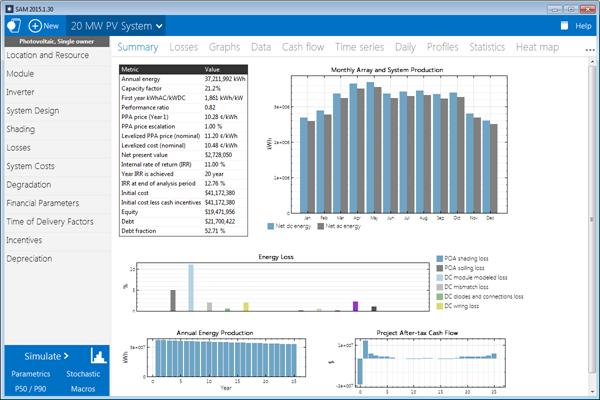
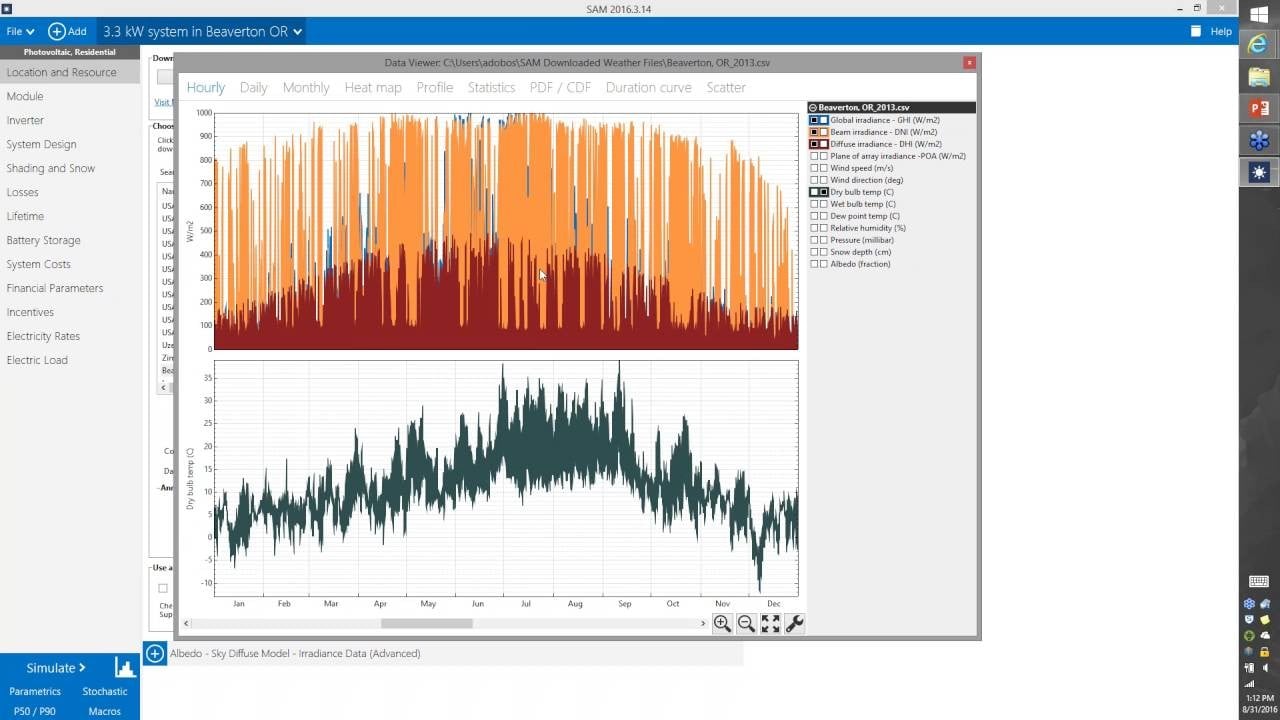
Screenshots

SAM (System Advisor Model) Pricing
SAM is completely free to download and use.
- Free Desktop Application: Available for Windows, macOS, and Linux.
- No Subscription Fees: All simulation features are included at no cost.
- Open-Source License: Distributed under the BSD 3-Clause License.
- Free Documentation and Training: NREL provides webinars, tutorials, and community support forums.
Integrations
SAM integrates with weather databases, programming environments, and external analysis tools.
- Weather Data Sources: Direct integration with NSRDB and other weather databases.
- Utility Rate Database: Connects with URDB for electricity tariff analysis.
- Python Integration: Supports PySAM and SDK workflows for automation.
- Excel Compatibility: Import and export simulation data using spreadsheets.
- Developer SDK: Supports C/C++, C#, Java, MATLAB, PHP, Python, and VBA.
- Third-Party Weather Services: Compatible with Solcast and external meteorological datasets.
How to Set Up SAM (System Advisor Model)
- Download the installer from the official NREL SAM website.
- Select the version compatible with your operating system.
- Install the application and launch the software.
- Register an email address to receive a free registration key.
- Activate the software using the provided key.
- Optionally install the SDK for custom scripting and automation workflows.
How to Use SAM (System Advisor Model)
Users typically begin by selecting a renewable energy technology and financial model for a new project. The next step usually involves downloading weather data for the project location using the built-in weather search tools.
After configuring technical parameters such as modules, inverters, and system orientation, users enter project financial assumptions including installation costs, loan structures, utility tariffs, and incentives. Once the simulation runs, SAM generates detailed dashboards with energy production forecasts, cash flow models, LCOE calculations, and exportable analytical reports.
What You Can Manage with SAM (System Advisor Model)
- Energy Production Reports: Analyze hourly and annual renewable energy generation.
- Financial Projections: Model long-term project cash flows, IRR, and payback periods.
- Battery Dispatch Strategies: Simulate charging and discharging behavior.
- Utility Rate Analysis: Compare tariff structures and electricity pricing impacts.
- System Sizing: Optimize PV array capacity and inverter ratios.
- Risk and Sensitivity Analysis: Evaluate weather uncertainty and cost variability.
FAQs
What does SAM (System Advisor Model) do?
SAM simulates renewable energy system performance and financial outcomes, helping users estimate energy production, project costs, and investment returns.
Who is SAM (System Advisor Model) best for?
It is designed for renewable energy developers, engineers, researchers, analysts, consultants, and students who require advanced technical and financial modeling capabilities.
Is SAM (System Advisor Model) free?
Yes, SAM is completely free and open-source software developed by NREL and funded by the U.S. Department of Energy.
What are the main limitations of SAM (System Advisor Model)?
Main limitations include the steep learning curve, desktop-only workflow, and the complexity associated with advanced renewable energy simulations.
What are the best alternatives to SAM (System Advisor Model)?
Popular alternatives include PVsyst, Aurora Solar, HelioScope, and PVWatts depending on project complexity and workflow requirements.




