Pylon Solar Design
Pros
- Low financial risk through pay-per-project pricing and no fixed monthly design subscription.
- Supports unlimited team members on one corporate account without additional per-seat fees.
- Fast workflow can move a project from the customer’s address to a completed proposal in under two minutes.
- Responsive multi-device interface allows field teams to prepare quotes on iPads during site visits.
- Detailed shading calculations are supported by regularly updated aerial imagery.
- Native single-line diagram generation simplifies electrical compliance and project handovers.
Cons
- Proposal template customization is limited mainly to logos, colors, and page removal.
- The software is not optimized for utility-scale solar farms or complex industrial installations.
- Per-project costs may become less economical for enterprise teams processing hundreds of designs each month.
- Premium high-resolution aerial imagery coverage varies by country and region.
Solar installers often struggle with expensive software subscriptions and complex workflows when building sales proposals for clients. Pylon Solar Design addresses these issues by offering a comprehensive design suite that eliminates monthly retainer fees and replaces them with a flexible pay-per-use structure. The platform provides installers with tools to quickly create solar layouts and generate professional, client-ready quotes.
Selecting the right solar engineering tool is essential for managing overhead costs and maintaining layout accuracy. Many small-to-medium residential teams rely on Pylon Solar Design because it supports unlimited user seats without recurring fixed costs. This review covers its primary features, pricing structure, and everyday usability to determine whether it fits your workflow.
What Is Pylon Solar Design?
Pylon Solar Design is a web-based software platform designed to help solar installers create PV system layouts, evaluate shading patterns, and build financial proposals. Operating within the renewable energy software sector, the application is primarily optimized for residential rooftop installations and small commercial projects.
The platform serves sales representatives, engineers, and project managers who need fast on-site or remote design capabilities.
The software uses a top-down, 2D-first design environment that allows users to arrange components over high-resolution imagery without navigating complex 3D viewports. It calculates 3D architectural dimensions using cast shadows and solar positioning data.
The platform was recognized as the number-one solar design tool in Australia by the 2025 Solar Nerds survey and received the Finder Award for Best Solar Innovation in 2021.
Features
- 2D-first design studio: Allows installers to place, rotate, duplicate, and arrange solar panels directly on rooftops using a mouse or mobile touchscreen.
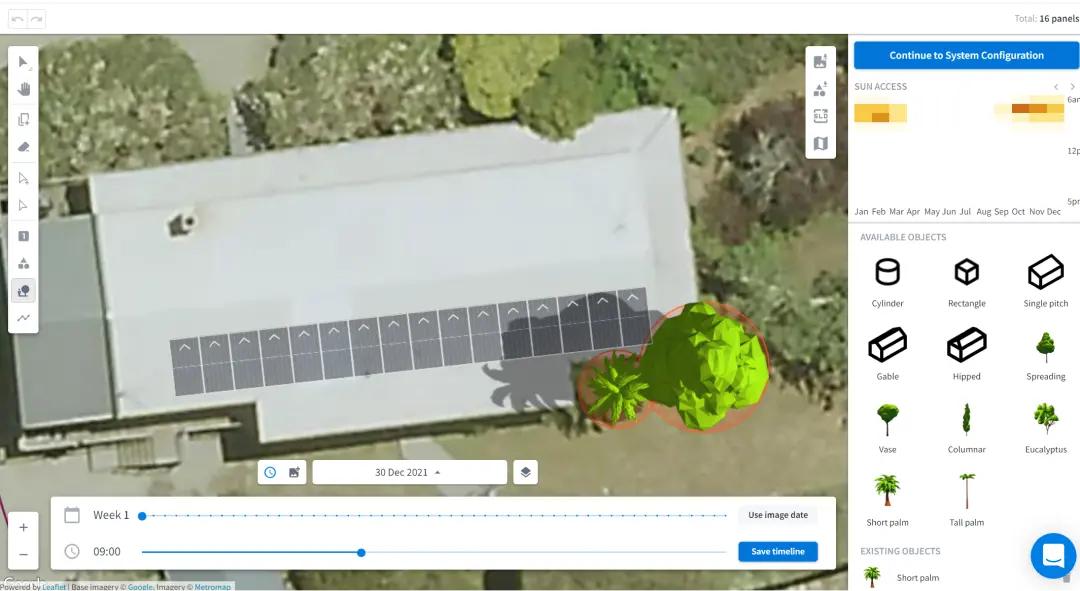
- 3D solar shading analysis: Calculates the height and dimensions of surrounding obstructions using shadow lengths and solar azimuth data to generate year-round, minute-by-minute shading reports.
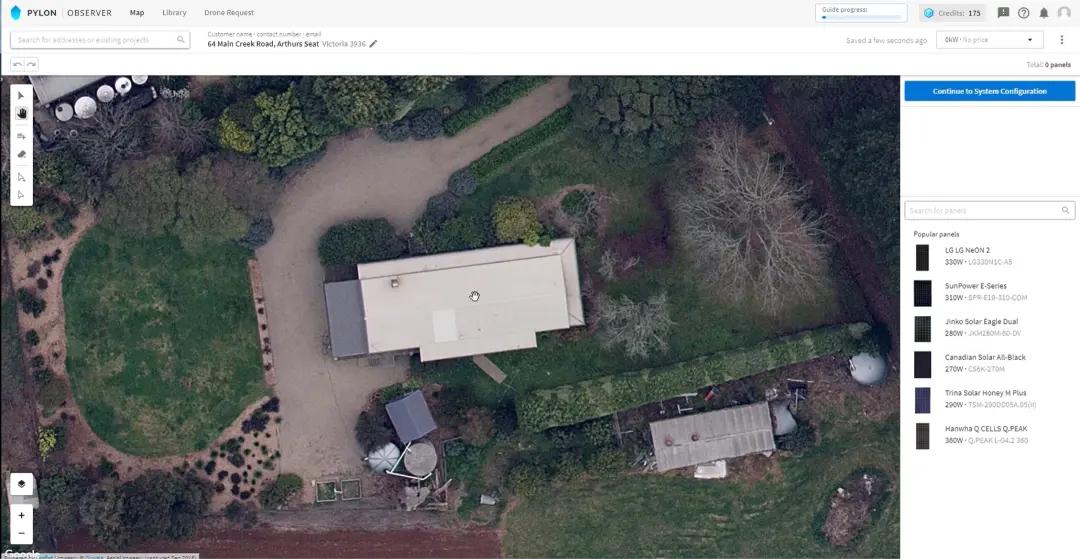
- High-resolution aerial imagery: Includes premium mapping data, such as Nearmap or MetroMap coverage in supported countries, reducing the need for separate mapping subscriptions.
- Comprehensive component database: Contains data for more than 20,000 solar panels, 20,000 inverters, and various battery storage systems, including Tesla Powerwall, Sigenergy, and Sungrow products.
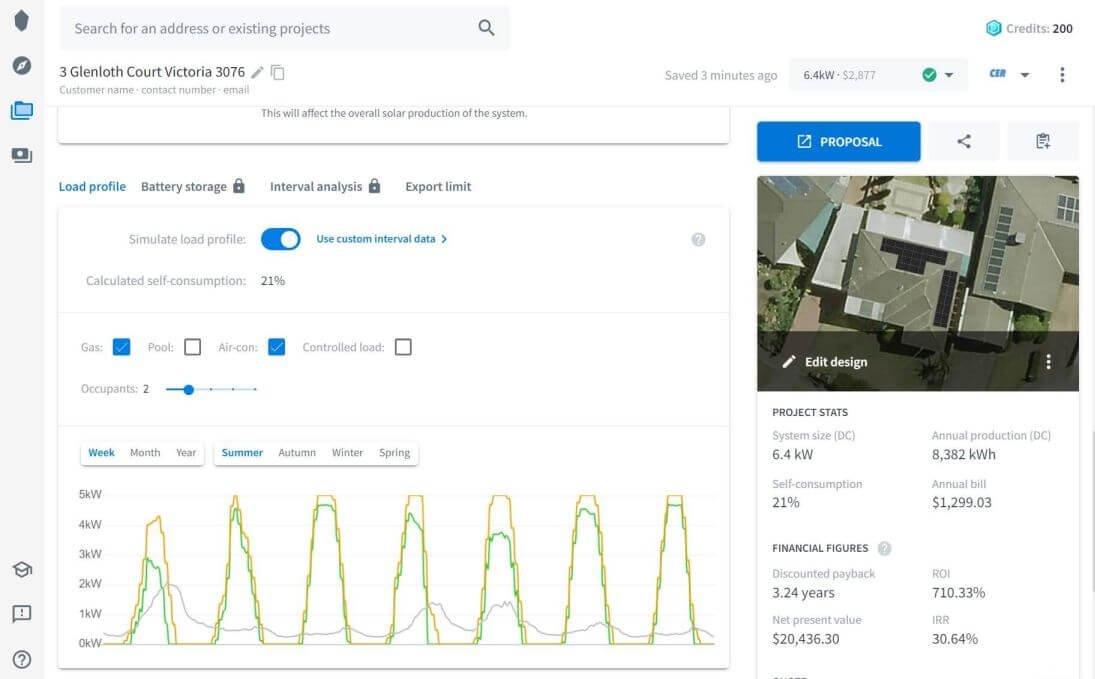
- Financial modeling and ROI tracking: Combines solar production simulations with customer utility rates and seasonal load profiles to calculate payback periods, internal rates of return, and net present value.
- Single-line diagrams: Automatically creates electrical schematics required by grid operators, installation teams, and regulatory inspectors.
- Integrated proposal builder: Generates live web links and exportable PDF proposals featuring interactive energy storage graphs, component summaries, and online payment options.
Screenshots
Pylon Solar Design Pricing
Pylon Solar Design uses a pay-per-project pricing model instead of traditional monthly user subscriptions. This structure includes unlimited team members and access to the platform’s core features.
- Free Tier: Includes five free Standard projects after registration without requiring a credit card.
- Standard Project: Costs $4 per project and includes standard design features, high-resolution imagery, and document generation.
- Pro Project Upgrade: Costs an additional $6, bringing the total cost to $10 per project. It includes advanced battery simulations, custom load profiles, and support for system capacities from 30 kW to 99 kW and above.
- Document Add-ons: Electronic signatures cost $0.80 per project.
- CRM Add-on: Advanced customer relationship management features are available for $49 per user per month.
- Transaction Fees: Online deposit collection through the integrated payment gateway is subject to a 2.5% processing fee.
Integrations
Pylon Solar Design offers built-in integrations and utility connections to support data exchange across different business platforms.
CRM and Lead Integrations
- Solar Choice: Automatically transfers prospective customer information and project details into Pylon workspaces through secure API keys.
- ServiceM8: Synchronizes customer job profiles and field deployment information.
Accounting Integrations
- Xero: Connects proposal finances and invoice generation with back-office accounting records.
API and Webhooks
- Custom API: Connects corporate systems, lead sources, and legacy customer databases to the Pylon design environment.
How to Set Up Pylon Solar Design
- Create a company profile on the official platform without entering upfront billing details.
- Redeem the five complimentary Standard project credits included with a new account.
- Configure your company identity by adding a logo, default color palette, and regional business information.
- Enter custom API credentials if connecting an existing lead platform such as Solar Choice.
- Set default component preferences to prioritize frequently used panel, inverter, and battery brands.
- Create a new project, enter the customer’s address, and begin the first system layout.
How to Use Pylon Solar Design
Users begin by entering a customer’s property address into the project dashboard to load high-resolution aerial imagery. They can then use click-and-drag drawing tools to trace roof boundaries, place panels, and apply the automatic duplication tool to fill the available area.
Next, users mark nearby trees, buildings, and other obstructions so the system can simulate shading patterns throughout different times of the day and year.
After arranging the rooftop array, installers select inverters and add battery storage systems from the built-in component catalog. Users can upload local grid interval records or NEM12 data to reflect the homeowner’s actual energy consumption patterns.
Finally, installers can add equipment markups, apply relevant regional incentives, and send the completed financial proposal directly to the client by email for review and electronic signature.
What You Can Manage with Pylon Solar Design
- Solar array layouts: Precise module positioning maps created over high-resolution aerial imagery.
- Client proposals: Interactive online proposals and downloadable PDF documents summarizing system benefits and costs.
- Shading loss reports: Detailed year-round analysis showing when and where shadows affect the solar array.
- Electrical schematics: Single-line diagrams showing the electrical path from the solar panels to the main grid connection.
- Project ROI projections: Financial estimates covering payback periods, utility savings, internal rates of return, and net present value.
- Job handover kits: System owner manuals, component details, and engineering documents for installation teams and customers.
FAQs
What does Pylon Solar Design do?
Pylon Solar Design is a web-based solar engineering and proposal platform for installers. It helps teams position panels on high-resolution maps, analyze shading, calculate project financial returns, create electrical diagrams, and send digital quotes to prospective customers.
Who is Pylon Solar Design best for?
The platform is suitable for small-to-medium solar installation businesses, residential project designers, and field sales teams that need fast on-site quoting tools without high fixed software costs.
Is Pylon Solar Design free?
Pylon Solar Design includes five free Standard projects after registration, with no credit card required. Once these initial credits have been used, customers move to a pay-per-project pricing model rather than a recurring monthly design subscription.
How much does Pylon Solar Design cost?
Standard projects cost $4 each, while a Pro project with advanced battery simulations and support for larger systems costs $10 in total. Optional features include electronic signatures for $0.80 per project and an advanced CRM workspace for $49 per user per month.
What are the main limitations of Pylon Solar Design?
The platform offers limited proposal template customization and is not intended for utility-scale solar farms or complicated multi-structure industrial projects. Premium aerial imagery is also not equally available in every geographic region.
What are the best alternatives to Pylon Solar Design?
Common alternatives include OpenSolar, Aurora Solar, HelioScope, and SolarPlus.