Nearmap
Pros
- Extremely high-resolution imagery superior to most satellite providers.
- Frequent aerial updates improve project monitoring accuracy.
- Powerful AI-based property and asset detection tools.
- Large historical imagery archive for before-and-after comparisons.
- Strong integrations with professional GIS and CAD software.
- User-friendly MapBrowser interface.
- Excellent for solar feasibility studies and construction tracking.
Cons
- Premium pricing may be expensive for small businesses.
- No transparent public pricing structure.
- Coverage availability is strongest in urban and suburban regions.
- Additional fees may apply for advanced AI and 3D datasets.
- Imagery updates depend on scheduled aircraft flights.
Managing infrastructure, solar development, construction, or urban planning projects requires highly accurate and up-to-date visual site data. Traditional satellite imagery often lacks the resolution needed for detailed analysis, while drone inspections and field surveys can be expensive, time-consuming, and difficult to scale across large portfolios. Nearmap solves this problem by providing ultra-high-resolution aerial imagery captured from aircraft and updated multiple times per year.
Used across industries such as solar energy, engineering, construction, insurance, and government, Nearmap allows professionals to inspect sites remotely with remarkable clarity. The platform combines advanced aerial imagery, 3D modeling, and AI-powered property analysis into a cloud-based location intelligence system.
What Is Nearmap?
Nearmap is a location intelligence and aerial imagery platform that provides high-resolution aerial photography, 3D content, and AI-powered geospatial analysis.
Unlike traditional satellite providers, Nearmap captures imagery using aircraft equipped with patented camera systems, delivering imagery with a ground sampling distance (GSD) of approximately 5.5 cm (2.2 inches). The platform is widely used for GIS analysis, solar site assessments, construction monitoring, insurance underwriting, and urban planning.
Features
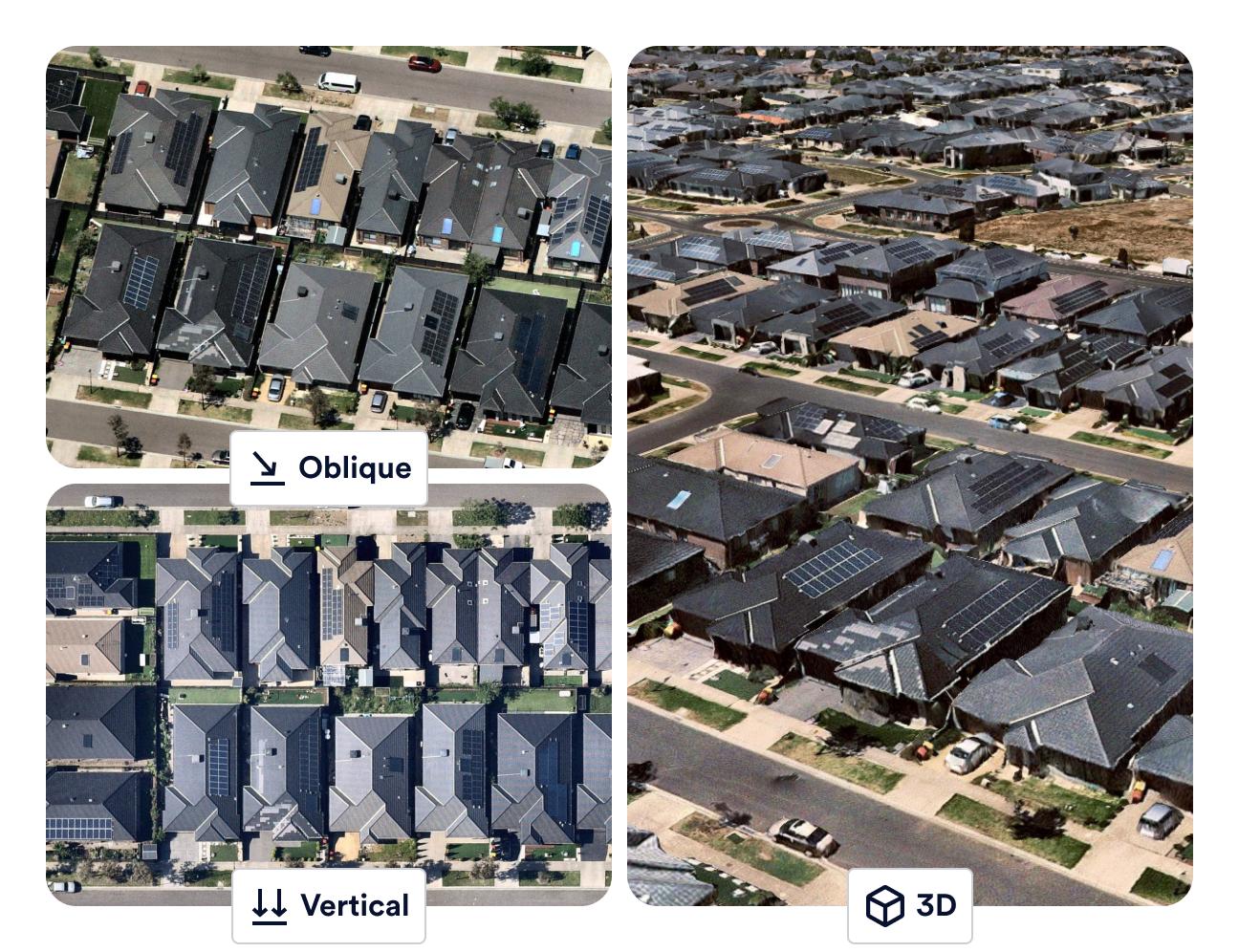
- Vertical Imagery: High-resolution top-down imagery for precise measurements and site analysis.
- Oblique Imagery: 45-degree angled imagery for viewing building sides, roof pitch, and structural details.
- Nearmap 3D: Generate textured meshes, digital surface models (DSM), and terrain visualizations.
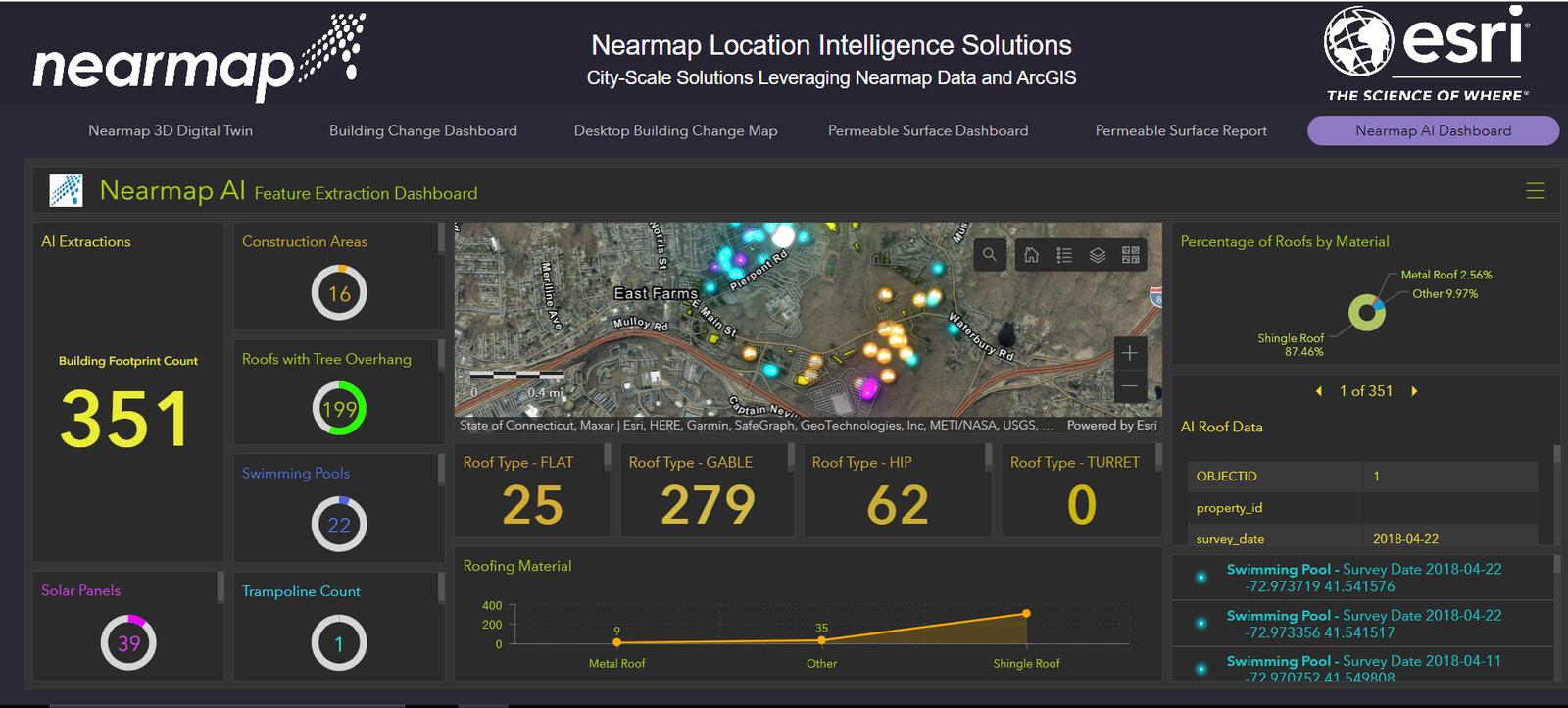
- Nearmap AI: Automatically detect and classify over 130 property features including roof types, solar panels, and vegetation.
- Historical Imagery Archive: Compare previous captures to track construction and land-use changes over time.
- Near-Infrared (NIR) Imaging: Analyze vegetation health and land conditions using infrared data.
- MapBrowser Export Tools: Export georeferenced imagery in JPEG and GeoTIFF formats.
Screenshots



Nearmap Pricing
Nearmap uses a custom enterprise subscription model based on coverage requirements, data usage, and advanced feature access.
- Coverage-Based Pricing: Pricing depends on the geographic area being monitored.
- Feature-Based Plans: 3D modeling and AI analytics may require premium licensing.
- User Seat Licensing: Pricing scales based on the number of users and access levels.
- Multi-Year Agreements: Long-term contracts may reduce subscription costs.
- Demo and Trial Access: Organizations can request demos and limited trial access.
Integrations
Nearmap integrates with major GIS, CAD, and enterprise software platforms.
- GIS Platforms: ArcGIS, QGIS, and Global Mapper.
- CAD and Engineering: AutoCAD, Civil 3D, Revit, and Bentley Systems.
- 3D Visualization: Cesium, Trimble, and Skyline integrations.
- Identity Management: Microsoft Entra ID, Okta, and Active Directory Federation Services.
- APIs and Webhooks: WMS 2.0, Tile API, AI Feature API, DSM API, and True Ortho API.
How to Set Up Nearmap
- Request a demo and review available coverage areas.
- Select subscription options based on imagery and user requirements.
- Create organizational accounts and configure permissions.
- Generate API credentials for GIS or CAD integrations.
- Train teams on MapBrowser and export workflows.
- Start analyzing sites and exporting geospatial data.
How to Use Nearmap
Users begin by entering an address or selecting a region inside MapBrowser. Depending on the project requirements, they can switch between vertical, oblique, or 3D views and browse historical imagery captures.
Teams can then use measurement tools to calculate distances, roof areas, terrain elevation, and object dimensions. AI layers can automatically identify roof materials, vegetation, and solar potential, while exported georeferenced imagery supports GIS analysis and engineering workflows.
What You Can Manage with Nearmap
- Site Assessments: Analyze solar, construction, and infrastructure sites remotely.
- Urban Development Monitoring: Track land-use and building changes over time.
- Asset Inspections: Review roofs, utilities, and infrastructure without onsite visits.
- Risk Modeling: Analyze vegetation, roof conditions, and property exposure.
- Vegetation Management: Identify overgrowth near infrastructure using NIR data.
- Project Reporting: Create visual reports for clients and stakeholders.
FAQs
What does Nearmap do?
Nearmap provides ultra-high-resolution aerial imagery, 3D mapping, and AI-powered location intelligence for industries such as solar energy, construction, engineering, and insurance.
Who is Nearmap best for?
It is ideal for solar developers, construction companies, government agencies, engineers, insurers, and GIS professionals requiring highly detailed aerial site data.
Is Nearmap free?
No, Nearmap is a commercial subscription platform, although trial access and demonstrations may be available.
What are the main limitations of Nearmap?
Main limitations include premium pricing, limited rural coverage in some regions, and dependence on scheduled aircraft imagery updates.
What are the best alternatives to Nearmap?
Popular alternatives include EagleView, Vexcel, Maxar satellite imagery, and drone-based surveying providers.