PVFARM
Pros
- Enables rapid layout iterations and may reduce early-stage design timelines by up to 96%.
- Operates entirely in the cloud, eliminating the need for powerful local computers or additional CAD licenses.
- Provides grading analytics that help reduce earthwork volumes and civil construction costs.
- Combines clear 3D visualizations with real-time electrical and energy modeling calculations.
- Improves collaboration by keeping civil, electrical, mechanical, and energy metrics in one shared environment.
- Provides responsive customer support and regularly introduces features based on user feedback.
Cons
- Does not publish standard subscription pricing, making a sales consultation necessary for budgeting.
- May involve a learning curve for engineering teams accustomed to traditional desktop drafting software.
- Offers fewer standalone CAD editing tools than general-purpose drafting platforms.
- Primarily designed for utility-scale projects and is not an ideal fit for residential solar installations.
Building a utility-scale solar project means constantly balancing land topography, electrical wiring, and civil engineering constraints. Traditional workflows usually rely on disconnected software tools, which forces engineers to manually tweak layouts repeatedly—a slow process that can lead to costly design mistakes.
PVFARM addresses these engineering and workflow challenges with an AI-driven, browser-based platform built specifically for large-scale solar farms. By automating layout creation, earthwork estimates, and cable routing, it allows developers, engineers, and manufacturers to test dozens of site configurations in minutes rather than weeks.
What Is PVFARM?
PVFARM is a standalone, fully web-based design and engineering platform created primarily for the utility-scale solar industry. It serves as a specialized layout optimization tool that connects initial site screening with detailed, engineering-grade project planning.
The platform brings multidisciplinary teams—including civil, mechanical, electrical, and energy engineers—together in a single collaborative workspace. Instead of forcing teams to adapt general-purpose CAD software for solar projects, PVFARM provides a purpose-built environment for rapid scenario testing.
Users can enter specific site constraints, model local terrain, and immediately see how their design choices affect physical layouts, material requirements, and project costs.
Features
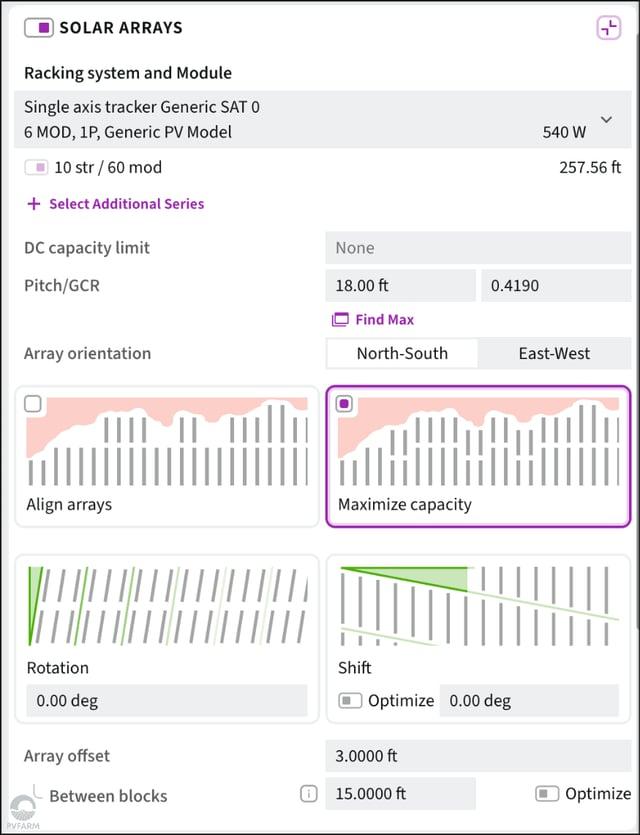
- Layout & System Design: Automatically generates utility-scale solar layouts using real-world single-axis tracker and fixed-tilt hardware configurations. Teams can adjust design rules to create multiple viable site options in seconds.
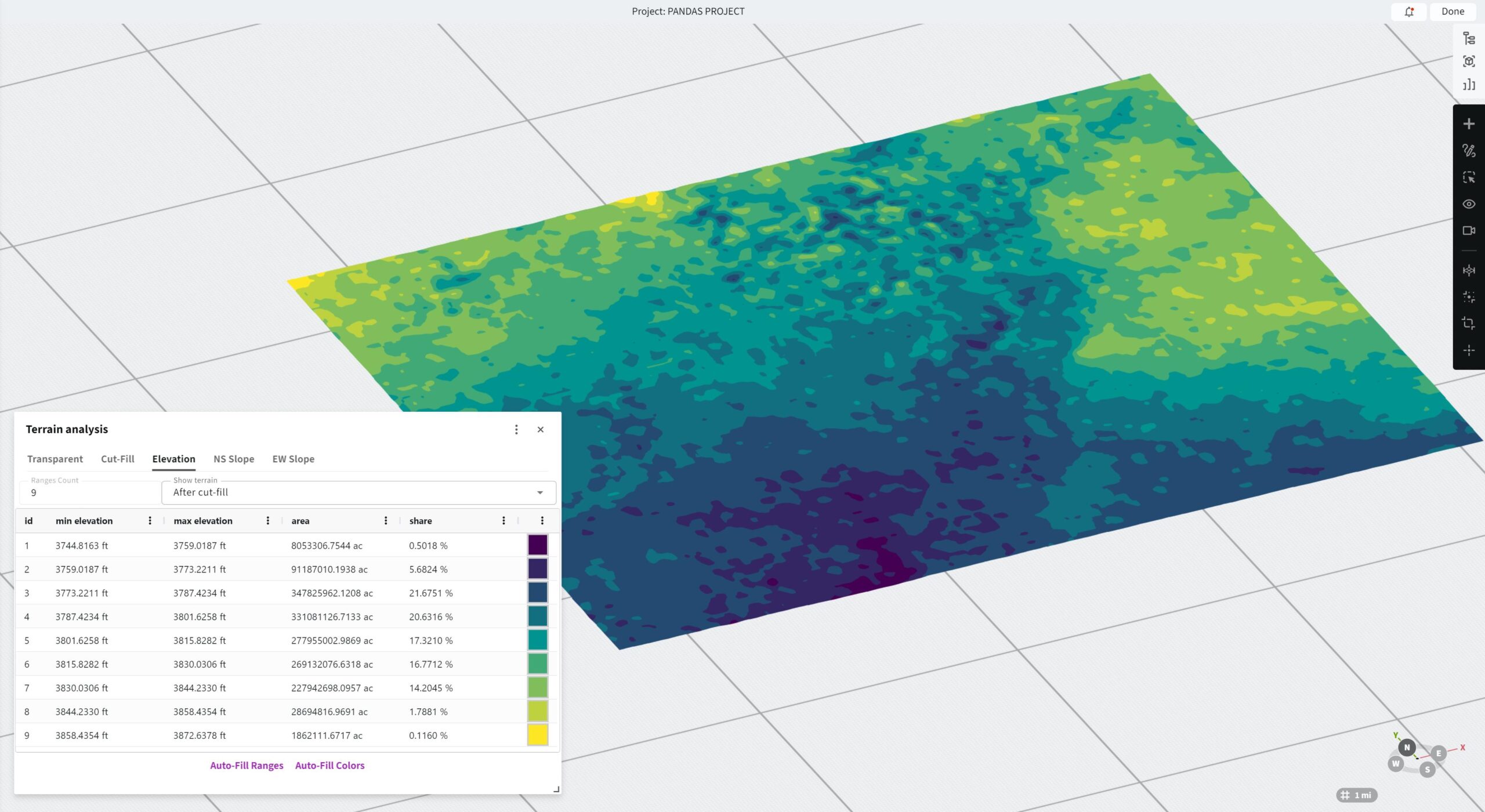
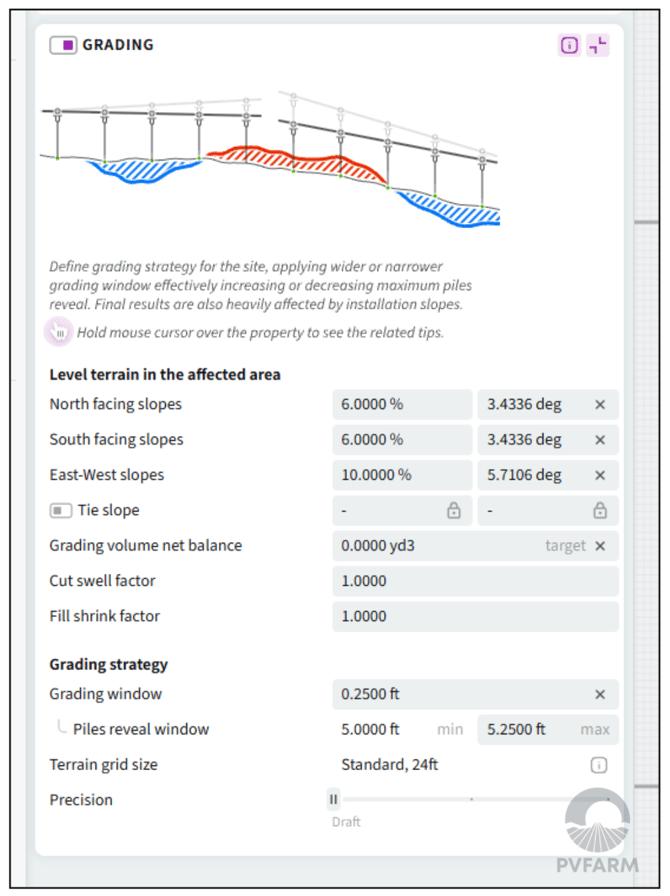
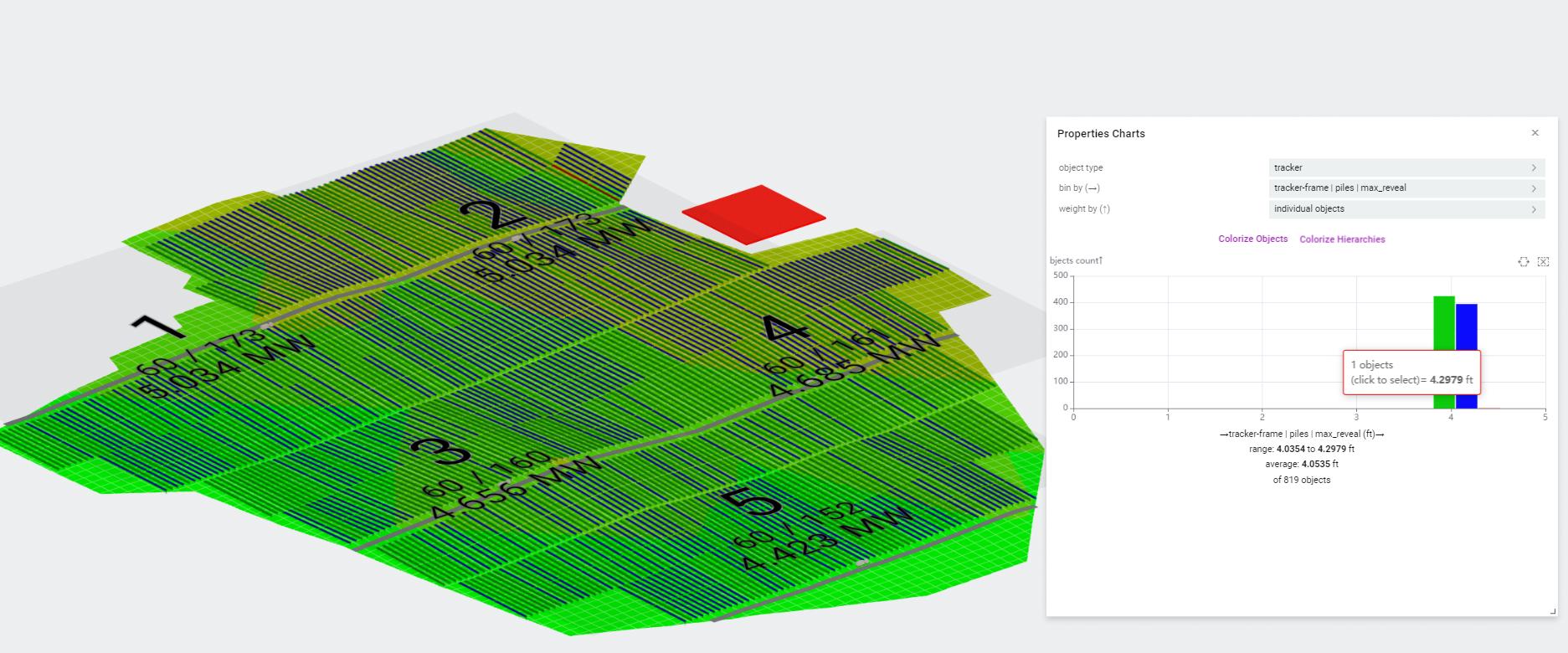
- Civil & Grading Optimization: Models local topography to check slope limits, analyze proposed ground levels, and calculate precise cut-and-fill earthwork volumes. It supports grading strategies such as table splitting, smoothing, and pile-adaptive methods.
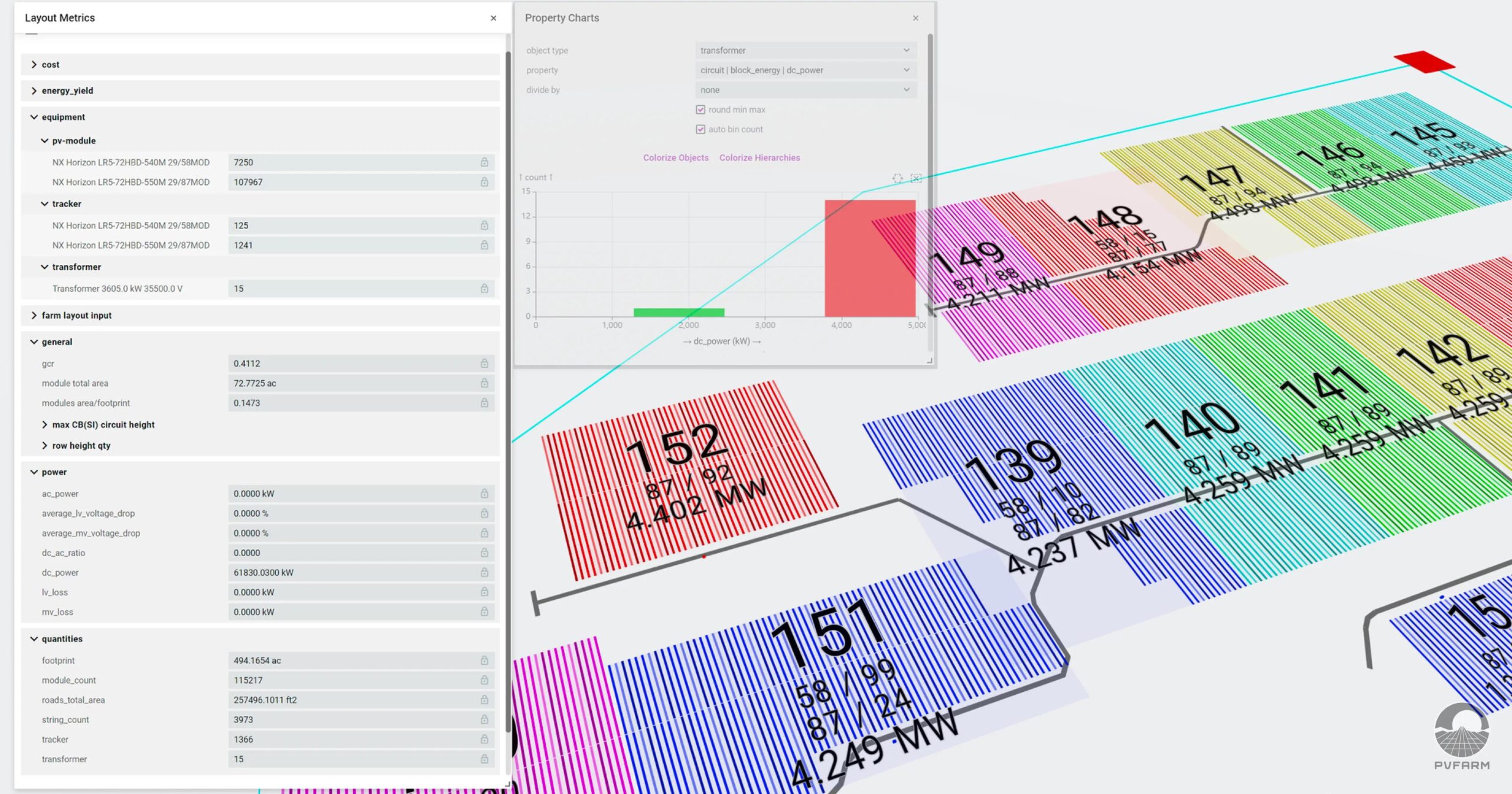
- Real-Time Feedback & Analytics: Provides immediate feedback on design changes across engineering metrics, including preliminary energy yield estimates and automated bills of quantities.
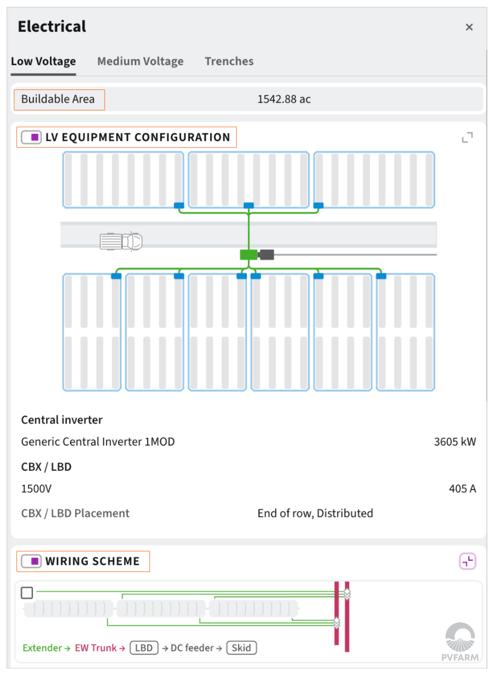
- Electrical Package Routing: Automatically creates optimized cable routes for Line, U-shape, Leapfrog, and other string layouts. It calculates voltage drop for each string and dynamically sizes cables to reduce material costs.
- 3D BIM Equipment Assets: Imports manufacturer-specific equipment specifications and 3D Building Information Modeling assets directly into site layouts to support detailed engineering and commercial quotes.
Screenshots
PVFARM Pricing
PVFARM does not publish its subscription tiers or standard pricing online. Interested teams must contact the sales department or schedule a live demonstration to receive a custom quote.
Pricing may depend on:
- The number of users requiring platform access.
- The size and number of projects being designed.
- The engineering features and modules required.
- The level of onboarding and technical support included.
- Enterprise integration and data export requirements.
Although subscription costs are private, PVFARM offers a free one-week trial with one-on-one support. This allows prospective customers to test the platform using active, real-world workflows before purchasing a subscription.
Integrations
Public details about PVFARM integrations are limited, so teams should confirm compatibility with their existing software during the demo or sales consultation.
Confirmed integration types include:
- CAD Tools: Supports data transfers and file exchanges with standard CAD environments for downstream drafting and documentation.
- Equipment Libraries: Integrates with manufacturer-supplied databases containing electrical equipment, solar modules, inverters, and racking hardware.
How to Set Up PVFARM
- Book an initial discovery call or product demonstration through the official PVFARM website.
- Register for the free one-week trial to receive access to the platform.
- Log in to the web interface without downloading or installing local software.
- Complete the account setup and onboarding process with the assigned support specialist.
- Configure project preferences, default measurement units, equipment options, and tracking variables.
How to Use PVFARM
A typical workflow begins by uploading project context files, environmental boundaries, exclusion zones, or property lines to the cloud workspace. The user then configures project parameters by selecting solar modules, inverters, and tracker systems from a library of manufacturer components.
PVFARM’s algorithms automatically generate optimized layout options based on the selected equipment and site constraints. Engineers can use the civil visualization tools to analyze grading requirements, identify steep slopes, and review cut-and-fill calculations.
Users can instantly modify layouts, change string configurations, or compare different grading strategies to evaluate their effect on costs and project feasibility.
Once the design is finalized, project data can be shared with engineering or finance partners and exported to downstream tools for further documentation and analysis.
What You Can Manage with PVFARM
- Utility-Scale Solar Layouts: Create buildable 3D solar layouts for large project sites with capacities of up to 800 MW.
- Earthwork and Grading Models: Analyze cut-and-fill maps, terrain deviations, proposed ground levels, and slope boundaries to identify cost-effective construction strategies.
- Electrical Routing and Topologies: Generate optimized string routes and calculate detailed voltage drop matrices.
- Material Requirements: Generate bills of quantities and automated cost breakdowns based on selected equipment and layout configurations.
- Energy Performance Assumptions: Support financial models with preliminary, application-native energy yield projections.
FAQs
What does PVFARM do?
PVFARM is a cloud-based solar design platform that uses AI and automation to help engineering teams create and optimize utility-scale solar layouts. It streamlines terrain grading, cable routing, material calculations, and preliminary energy yield assessments.
Who is PVFARM best for?
The platform is built for utility-scale solar developers, civil and electrical engineers, EPC teams, and equipment manufacturers that need to create and evaluate layouts quickly. It is especially useful for organizations managing large project pipelines that want to reduce repetitive drafting work and optimize site earthworks.
Is PVFARM free?
No. PVFARM is a paid enterprise platform without a permanent free tier. However, the company provides a free one-week trial with dedicated onboarding support so prospective customers can test it on a pilot project.
Does PVFARM support integrations?
PVFARM supports data exchange with standard CAD environments and integrates manufacturer-supplied equipment information into its design workflows. Public details about other integrations are limited and should be confirmed with the company.
What are the main limitations of PVFARM?
The primary limitations are the lack of transparent pricing, an initial learning curve for teams accustomed to desktop tools, and limited native CAD editing capabilities. It works best as an advanced solar optimization platform rather than a complete replacement for general-purpose drafting software.
What are the best alternatives to PVFARM?
Common alternatives in the utility-scale solar design market include PVcase Ground Mount, HelioScope, RatedPower, and Aurora Solar. The best option depends on project scale, terrain complexity, CAD requirements, and preferred engineering workflows.