Sun Studio
Pros
- Provides advanced optical analysis tools for custom solar component design.
- Includes precise shading simulation capabilities for improving energy yield.
- Developed by Morgan Solar, an established solar technology company.
- Designed specifically for complex solar engineering and research workflows.
- Supports structural and optical modeling before physical production begins.
Cons
- Public pricing information is unavailable.
- Has a steep technical learning curve compared with drag-and-drop solar design tools.
- Provides limited public information about third-party software and hardware integrations.
- May be too specialized for residential installers that only need basic layouts and proposals.
Solar engineering projects require specialized tools to maximize energy capture and analyze how different geometric designs handle light. Sun Studio gives engineering teams the simulation and modeling environments they need for complex optical systems and solar arrays. By solving complicated geometric problems, the software helps engineers calculate performance metrics before building physical prototypes.
Choosing the right solar engineering application means finding a balance between modeling accuracy and analytical flexibility. Engineering teams use Sun Studio to evaluate the spatial, optical, and performance characteristics of advanced solar tracking systems and custom layouts. This review covers the features, capabilities, and setup process of Sun Studio.
What Is Sun Studio?
Sun Studio is a specialized solar design and optical analysis software package created by Morgan Solar. Built for engineers, researchers, and component designers, the platform focuses on simulating light behavior, geometric positioning, and efficiency metrics for complex solar configurations.
Unlike standard sales-focused proposal tools, Sun Studio operates as an engineering utility that handles low-level calculations, optical ray tracing, and precise panel alignment.
It provides a controlled environment where users can build and test custom structures, identify potential shading problems, and analyze how different layouts perform under simulated real-world conditions.
Features
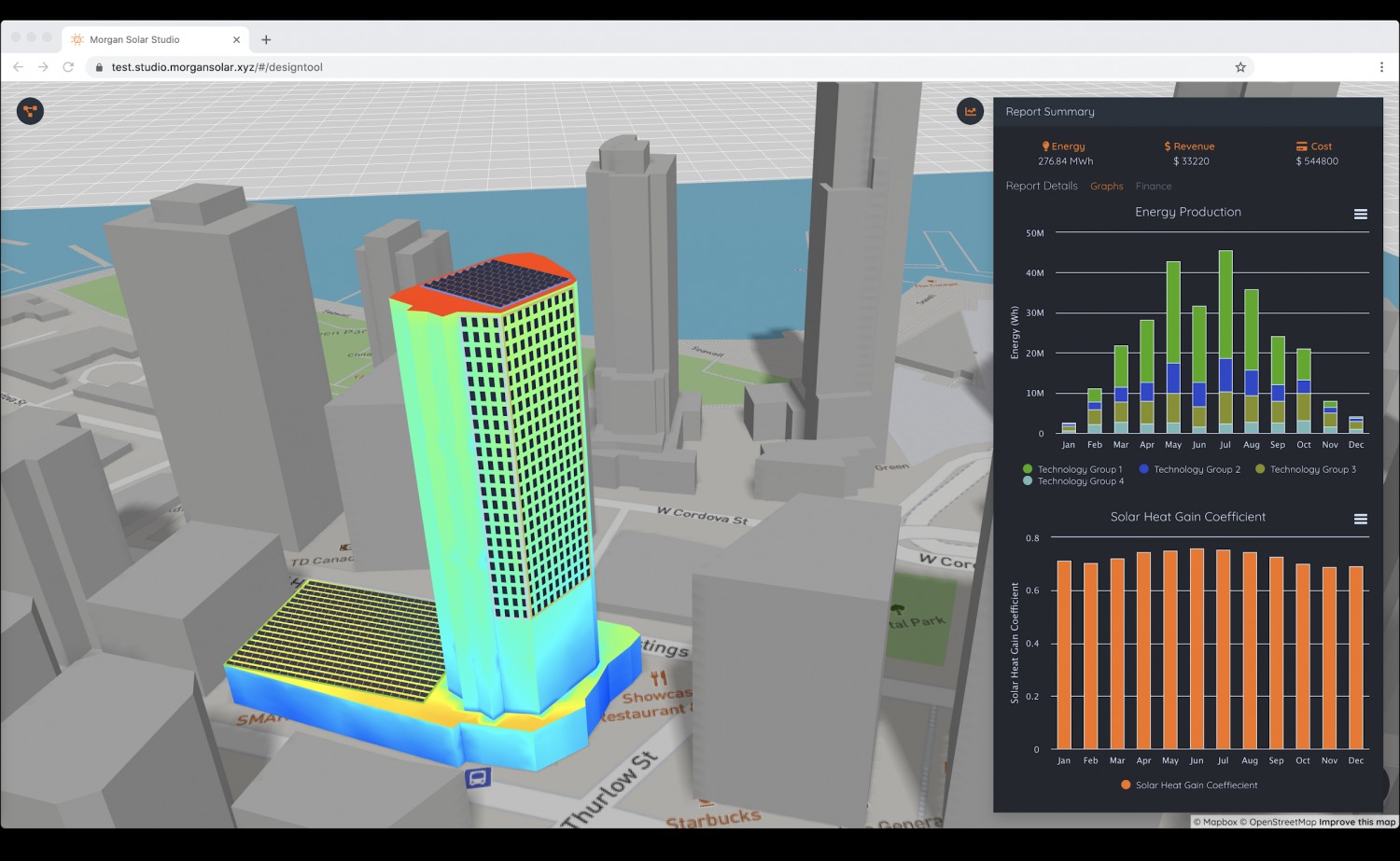
- Optical Path Simulation: Models how sunlight interacts with custom shapes, lenses, reflective surfaces, and tracking systems to improve component performance.
- Shading and Occlusion Analysis: Identifies potential structural obstructions and calculates shading impacts across different times of the day and seasons.
- Geometric Layout Planning: Allows developers to build, adjust, and scale solar arrays according to specific physical and spatial constraints.
- Performance Forecasting: Converts modeled optical efficiency and geographic coordinates into estimated energy production data.
Screenshots
Sun Studio Pricing
Pricing is not listed publicly. Morgan Solar asks interested organizations to contact its sales team or request a live demonstration to receive a custom quote.
The final cost may depend on:
- The number of users requiring access.
- The selected simulation and analysis capabilities.
- The complexity of the engineering projects.
- Enterprise onboarding and technical support requirements.
- Custom integration or data export needs.
Integrations
Public details about Sun Studio integrations are limited. Engineering teams should contact Morgan Solar directly to confirm compatibility with their existing design, simulation, and data management tools.
Potential users should verify:
- Supported CAD and geometric model formats.
- Available data import and export options.
- Compatibility with external energy simulation platforms.
- API availability for custom engineering workflows.
- Hardware and system requirements.
How to Set Up Sun Studio
- Visit the official Morgan Solar website and request a product demonstration or software access.
- Complete a technical onboarding call with a Morgan Solar engineering representative.
- Download the software package provided through the company’s secure enterprise channels.
- Configure local user permissions, project units, and global coordinate parameters.
- Open the main layout workspace and begin importing design models.
How to Use Sun Studio
Engineers begin by importing custom design dimensions or defining geometric parameters directly inside the software workspace. Once the base structure or panel arrangement is prepared, users add geographic data or simulated sun paths to reproduce seasonal changes.
During testing, engineering teams run optical ray-tracing models and shading simulations to evaluate how the system distributes and captures light.
If the results reveal problems, users can adjust component dimensions, spacing, orientation, or panel angles directly in the model.
Once the design is finalized, geometric results, efficiency profiles, shading calculations, and performance forecasts can be compiled into engineering reports for internal review or project approval.
What You Can Manage with Sun Studio
- Geometric Solar Designs: Create and adjust detailed solar layouts and component configurations.
- Shading Risks: Identify seasonal obstructions and calculate their effects on system performance.
- Optical Efficiency: Evaluate how custom solar materials, lenses, and structures interact with light.
- Energy Production Forecasts: Estimate energy generation using specific site coordinates and modeled optical performance.
FAQs
What does Sun Studio do?
Sun Studio is an optical modeling and solar engineering platform that allows technical teams to simulate, optimize, and evaluate custom solar structures and complex geometric configurations.
Who is Sun Studio best for?
The application is designed for solar engineers, optical researchers, and component developers who need precise geometric and optical analysis rather than standard sales proposals.
Is Sun Studio free?
No. There is no publicly available free tier or open subscription plan. Interested teams must contact Morgan Solar directly to ask about trials, demonstrations, and pricing.
Does Sun Studio support integrations?
Public information about Sun Studio integrations is limited. Prospective users should contact Morgan Solar to confirm supported file formats, APIs, hardware requirements, and compatibility with external engineering tools.
What are the main limitations of Sun Studio?
The primary limitations are its steep technical learning curve and the lack of public documentation about pricing and standard third-party integrations. Its specialized engineering focus may also make it unsuitable for simple residential solar sales workflows.
What are the best alternatives to Sun Studio?
Common alternatives include PVsyst, HelioScope, PV*SOL, and custom simulation models created with MATLAB or Simulink. The best choice depends on the required level of optical analysis, energy forecasting, and geometric customization.