
PV*SOL
Pros
- PV*SOL offers pretty accurate simulation results
- It supports hybrid and battery systems
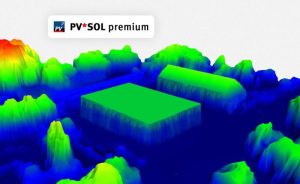
- The app has robust 3D visualization tools
- This software excels at shading analysis
Cons
- It’s a steep learning curve for beginners
- PV*SOL requires powerful computer hardware
- The platform can be quite pricey for small users
Solar design software usually comes in two categories: the super simple ones that look easy but aren’t very accurate, and the super complex ones that feel like you need advanced training just to get started. PV*SOL lands somewhere in between, but definitely leans toward the professional side of things.
It’s the kind of tool solar engineers quietly depend on when they need results that actually match real-world performance. It’s not flashy or overly simplified—it’s built for precision. And in solar design, accuracy is what really counts.
What is PV*SOL?
PV*SOL is basically a pro-level solar simulation tool used to design and analyze photovoltaic systems. It works for everything from small home setups to big commercial projects. The idea is pretty straightforward—you build a virtual model of your solar system, set up all the components, and then the software runs the numbers to show you how it would perform over time.
Unlike basic solar calculators, PV*SOL factors real-world intricacies such as shading from nearby buildings, weather patterns, system losses, and battery storage behavior.
Features
To get a better feel for the software, here are its core features at a glance:
3D system modeling
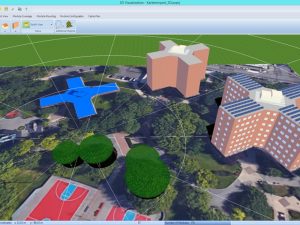
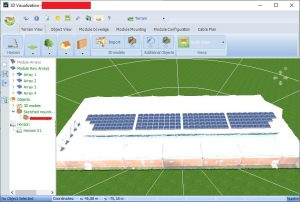
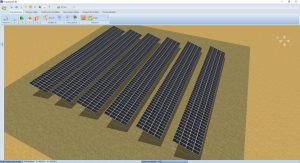
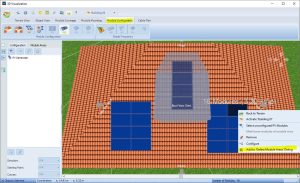
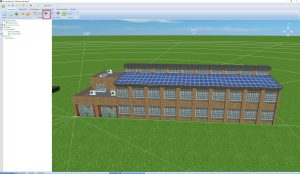
With PV*SOL, you can build a full 3D model of a building or site. The app allows you to place solar panels directly on rooftops, adjust angles, and to get a sense of how the systems will look.
It’s an aspect that comes in handy, particularly when detecting potential shading issues as soon as they happen, giving you a clear visual understanding of how real-world structures affect solar performance.
Advanced shading simulation
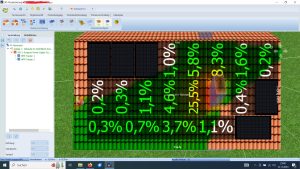
The software gives you a super detailed look at shading. It figures out how things like buildings, trees, and other structures block sunlight over the year. That way, you don’t end up overestimating how much energy your system will produce—and your design stays realistic and financially sound.
Energy yield calculation
PV*SOL basically takes real weather data and how your equipment performs, then simulates your system’s energy output hour by hour for the whole year. This comes in handy as it helps you see a pretty realistic picture of how much energy your system will actually produce.
Battery storage simulation
You can easily model how your battery will perform, so you’re not just guessing how energy gets stored and used.
Component database
The app has a large database of solar panels, inverters, and batteries, which allows you to select real-world products for your simulation rather than generic components.
Financial analysis tools
PV*SOL has the ability to estimate project costs, savings, and return on investment. You can model different tariff structures and consumption patterns, which come in handy particularly when a client wants to understand payback periods and long-term benefits.
Screenshots
PV*SOL Pricing
PV*SOL is not a cheap tool, and its pricing usually tends to vary based on licensing type. The basic license will set you back €585,00 EUR (including VAT), while going for the premium version will bump your price to €845,00 EUR (including VAT).
Integrations
PV*SOL integrates well with:
- 3D CAD and design tools
- Weather data sources such as Meteonorm and Meteosyn
- Solar component databases
- Reporting generation tools
However, the software is usually a standalone desktop tool rather than a fully cloud-based ecosystem.
How to Use PV*SOL
Getting started with PV*SOL doesn’t require much once you know your way around it. Here’s how you set up your platform:
Install the software
Get the PV*SOL app from the official Valentin Software website and install it on a Windows machine. Note that the software is desktop-based.
Create a new project
Start by defining your project type, whether it’s commercial or hybrid. Enter location details for accurate weather data.
Build your 3D model
Use the built-in editor to create or import a building model. You can draw rooftops and define surfaces manually if needed.
Add solar components
Select modules, inverters, and batteries from the database. Place them on your 3D model and define the system layout.
Run simulation
Generate energy yield results. PV*SOL will calculate hourly performance, shading losses, and system efficiency.
Generate reports
Export professional reports showing performance, design details, and financial projections for clients.
FAQs
Is PV*SOL beginner-friendly?
For the most part, PV*SOL is made for professionals, so if you’re just getting started, it may require a bit of time to learn it properly.
Is PV*SOL better than free solar tools?
Yes, in terms of accuracy and detail. But free tools are quite fast for basic estimations.
Can PV*SOL be used for residential solar?
Yes, but it’s often overkill unless you want a detailed technical analysis.
Does PV*SOL work offline?
Yes, this software is a desktop application and works without internet after installation.
Is PV*SOL widely used in the industry?
Yes, especially among engineers and designers who need accurate simulation reports.
Can PV*SOL replace PVsyst?
Not really. PV*SOL works best with residential, commercial, and battery-integrated projects, while PVsyst shines in utility-scale projects.




