Siemens Navigator
Pros
- Extremely scalable, capable of managing thousands of buildings across a global portfolio.
- Provides a holistic view by integrating both energy supply or procurement and demand or consumption data.
- Strong sustainability features that simplify carbon footprint reporting and regulatory compliance.
- Backed by Siemens' extensive domain expertise and a global network of energy analysts.
- Advanced fault detection helps reduce maintenance costs and extend the lifespan of building assets.
- User-friendly, customizable interface with localized support in multiple languages.
- Proven track record with a large global user base and industry awards.
Cons
- Lack of transparent, public pricing makes it difficult for smaller organizations to benchmark costs.
- Initial setup and data integration for legacy buildings can be complex and time-consuming.
- The platform’s extensive feature set may have a steeper learning curve for non-technical users.
- Primarily targeted at enterprise-level clients, which may make it over-engineered for very small businesses.
Managing energy consumption and operational costs across a large portfolio of buildings is a complex challenge for modern organizations. Rising utility prices, strict environmental regulations, and the need for operational efficiency require more than simple manual tracking. Siemens Navigator addresses these issues by providing a centralized, data-driven platform that integrates energy procurement, consumption tracking, and system performance analysis.
The platform is designed for facility managers, energy consultants, and sustainability officers who need actionable intelligence to optimize their infrastructure. By connecting building systems to the cloud, Siemens Navigator allows users to identify inefficiencies in real time, benchmark performance across multiple sites, and justify investments in energy-saving measures. It serves as a comprehensive tool for those moving toward more sustainable and cost-effective building operations.
What Is Siemens Navigator?
Siemens Navigator is a cloud-based Software-as-a-Service (SaaS) platform classified as an Energy Management System (EMS) and Building Analytics tool. It evolved from Siemens’ earlier Energy Monitoring & Controlling (EMC) software to provide a holistic view of both the supply and demand sides of energy management. The platform is engineered to handle everything from a single facility to a global network of thousands of sites.
The platform works by collecting data from various sources—including meters, Building Management Systems (BMS), sensors, and external utility invoices—and aggregating it in a secure cloud environment. High-level dashboards and specialized applications then analyze this data to provide insights into energy usage, CO2 emissions, and asset health. Siemens Navigator has a long-standing history, with roots dating back to 2002, and currently supports over 3,000 customers managing approximately 80,000 buildings worldwide. It has been recognized as a market leader by independent research firms like Verdantix.
Features
- Energy Monitoring and Reporting: Centralizes consumption data from electricity, gas, water, and heating to provide a clear picture of utility usage across an entire enterprise.
- Sustainability and Carbon Tracking: Automatically calculates greenhouse gas inventories and total CO2 emissions, helping organizations track progress against environmental targets and regulatory requirements.
- Utility Bill Management: Identifies billing errors from energy suppliers and helps manage energy procurement risks by comparing different supply options and market prices.
- Benchmarking and KPI Tracking: Allows users to establish Key Performance Indicators (KPIs) and compare the performance of different buildings or equipment to identify high-performing sites and those needing improvement.
- Fault Detection and Diagnostics (FDD): Analyzes building data to identify operational issues and equipment anomalies, allowing maintenance teams to take corrective action before failures occur.
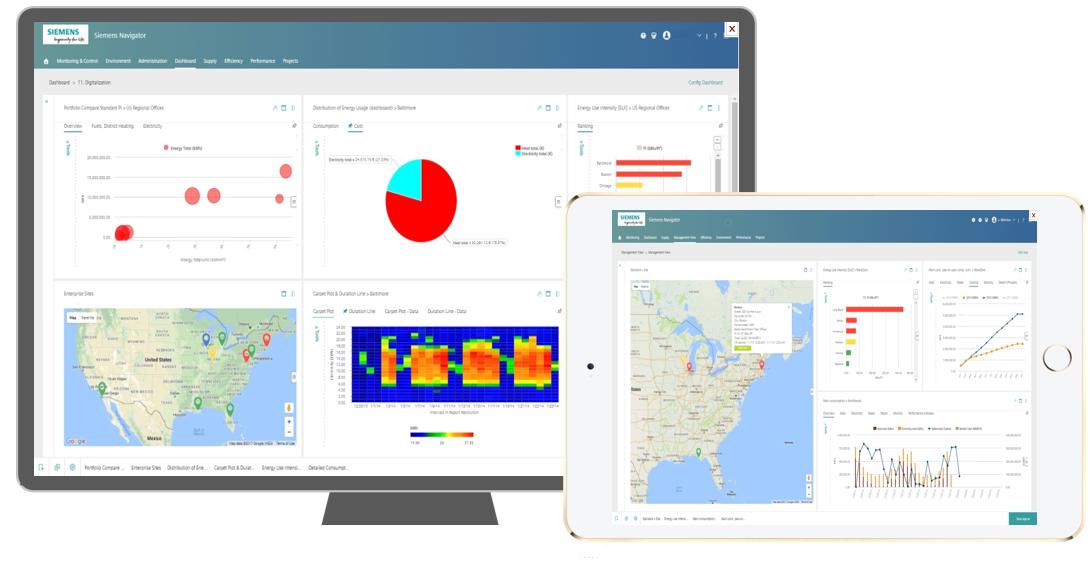
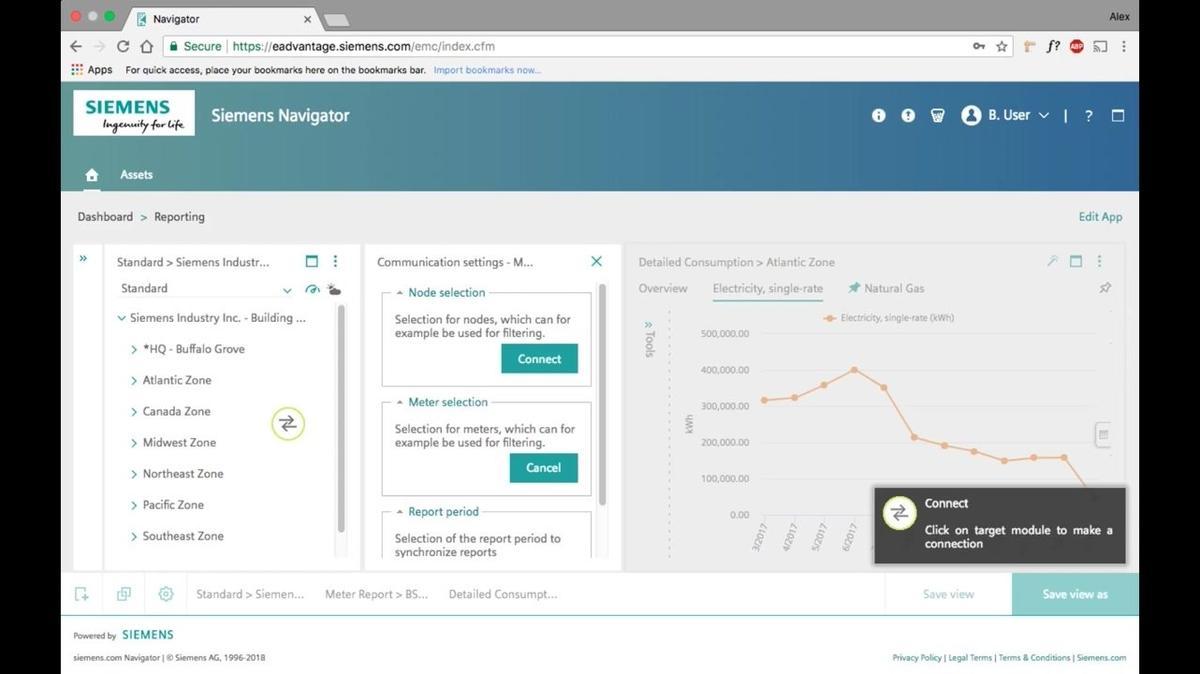
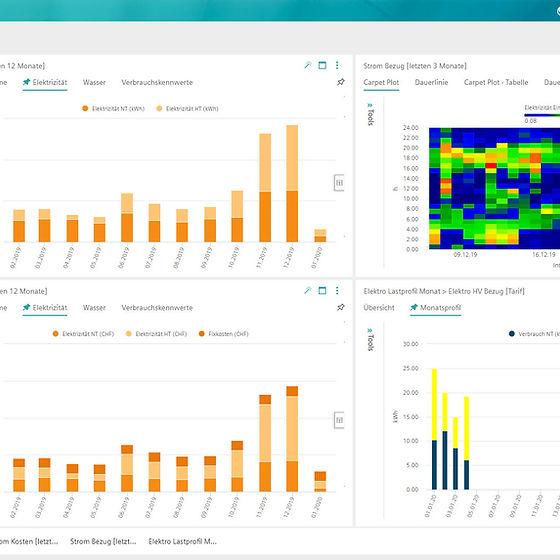
- Customizable Dashboards: Provides tailored views for different stakeholders, such as building managers or executives, ensuring that relevant information is available at a glance.
- Asset Health Monitoring: Tracks the condition and reliability of critical infrastructure, supporting a shift from reactive maintenance to more cost-effective predictive strategies.
- Predictive Analytics: Uses historical data and algorithms to forecast future energy needs and potential savings from efficiency projects, aiding in budget planning and risk mitigation.
Screenshots
Siemens Navigator Pricing
Pricing is not publicly listed. The company asks users to contact its sales team or book a demo for a custom quote.
The cost of Siemens Navigator typically depends on the scale of the deployment, including the number of connected buildings, the volume of data points or nodes being monitored, and the specific application modules required. Because it is a SaaS platform, it usually involves an annual subscription fee.
Integrations
Siemens Navigator is built with an open architecture to facilitate data exchange across different systems:
- Building Management Systems: Seamlessly integrates with Siemens Desigo CC and other major BMS platforms to collect operational data.
- IoT Platforms: Connects with Siemens MindSphere, the cloud-based open IoT operating system, for advanced data processing.
- Enterprise Systems: Offers a REST API for simple connections to third-party applications, including SAP systems and other asset management solutions.
- Utility and Metering: Supports integration with intelligent meter infrastructure and automated data acquisition from external utility providers.
- Cloud Infrastructure: Hosted on professional cloud environments like Amazon Web Services (AWS) and Microsoft Azure to ensure high availability and security.
How to Set Up Siemens Navigator
- Consult with a Siemens specialist to define your organizational goals and audit existing building infrastructure.
- Select the specific Navigator modules and apps that align with your energy and sustainability targets.
- Coordinate the connection of sensing devices, meters, and building management systems to the platform.
- Work with Siemens engineers to configure the cloud workspace, including site hierarchies and user access levels.
- Set up customized dashboards, KPIs, and automated reporting schedules.
- Train team members to interpret analytics and respond to system alerts.
How to Use Siemens Navigator
A typical daily workflow involves logging into the Navigator dashboard to review the “”traffic light”” status of your building portfolio, looking for any sites currently flagged for high consumption or equipment faults. Facility managers might use the Fault Detection and Diagnostics app to prioritize maintenance tasks based on which issues are causing the most energy waste.
Energy managers use the platform to generate weekly or monthly reports that compare actual consumption against budgets and historical benchmarks. During procurement cycles, users analyze supply-side data to evaluate different energy contracts and hedging positions. Sustainability officers use the environmental module to export greenhouse gas data for annual CSR reports or ensure compliance with local energy disclosure laws.
What You Can Manage with Siemens Navigator
- Energy Dashboards: Visualizations of real-time and historical utility consumption.
- Sustainability Reports: Automated carbon footprint and greenhouse gas inventory documents.
- Utility Budgets: Tools for tracking energy costs, identifying billing errors, and forecasting future spending.
- Project Portfolios: Management and tracking of energy efficiency projects and their ROI.
- Asset Health Logs: Data on the performance and maintenance needs of HVAC and electrical systems.
- Compliance Records: Real-time data gathered to verify that buildings meet external environmental regulations.
FAQs
What does Siemens Navigator do?
Siemens Navigator is a cloud-based data management platform that monitors and analyzes building performance. It helps organizations optimize energy consumption, manage utility costs, and track sustainability metrics across their entire real estate portfolio.
Who is Siemens Navigator best for?
The platform is designed for large organizations, facility managers, and sustainability teams that oversee multiple buildings or complex campuses. It is particularly valuable for enterprises looking to centralize fragmented data into a single source of truth.
Is Siemens Navigator free?
Siemens Navigator is a professional enterprise platform and does not offer a free version. However, interested organizations can usually request a demo or server tour to explore its functions before purchasing.
What are the main limitations of Siemens Navigator?
The primary limitations include the lack of transparent public pricing and the potential complexity of the initial setup. Because it is a powerful enterprise-grade tool, it may also require a period of staff training to fully utilize its advanced analytics features.
What are the best alternatives to Siemens Navigator?
Common alternatives in the energy and building management space include Schneider Electric EcoStruxure, ABB Ability Energy Manager, and Honeywell Forge. Other competitors include specialized IoT and energy analytics platforms like Johnson Controls OpenBlue or Entic.