KBase

Pros
- Completely free to use without subscription or per-project fees.
- Web-based architecture requires no local installation and works on Windows and macOS computers.
- Provides accurate structural calculations with automated Eurocode compliance.
- Transfers project information to major inverter and electrical design platforms through K2+.
- Offers an accessible graphical interface with Google Maps imagery.
- Generates detailed PDF reports containing structural calculations and assembly plans.
- Supports small residential rooftops and large commercial flat-roof projects.
Cons
- The platform is designed exclusively for K2 Systems mounting hardware.
- Electrical simulation features are limited compared with comprehensive platforms such as Aurora Solar or HelioScope.
- A stable internet connection is required for the editor, project data, and satellite imagery.
- Users unfamiliar with structural engineering terminology or Eurocode requirements may face a learning curve.
- The platform is not intended for most ground-mounted systems or custom-fabricated structures.
Solar installers and engineers often face time-consuming challenges when calculating wind and snow loads, determining the exact number of roof fasteners, and ensuring structural compliance for PV mounting systems. Manual calculations are prone to error and can lead to over-engineering or, more dangerously, an inadequately secured solar array.
KBase, commonly referred to as K2 Base, is a specialized planning tool developed by K2 Systems to automate these technical workflows. By providing a digital environment for mapping and structural verification, it helps professionals design mounting structures for pitched and flat roofs with high precision. It streamlines the transition from initial site selection to physical installation.
What Is KBase?
KBase is a cloud-based Software-as-a-Service (SaaS) platform for planning and dimensioning photovoltaic mounting systems. It belongs to the Solar Design Software category but focuses primarily on the mechanical and structural integrity of racking systems rather than electrical or financial simulation.
The platform is mainly used by solar installers, project planners, and structural engineers. It combines geographic information from Google Maps with roof specifications, local load data, PV module dimensions, and K2 mounting system requirements.
According to K2 Systems, the platform has more than 50,000 users worldwide. It helps professionals prepare designs that comply with applicable Eurocode standards and national requirements for structural safety and stability.
KBase Features
Google Maps Integration
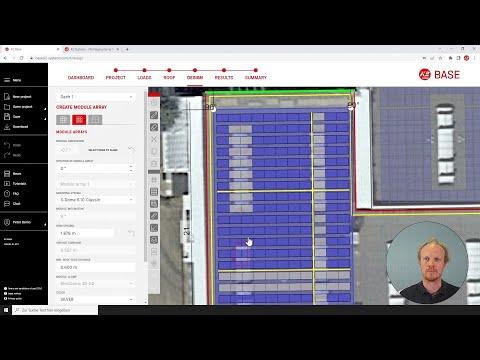
Allows users to locate projects and use satellite imagery as the foundation for drawing roof boundaries, module fields, and restricted areas.
Automatic Load Determination
Automatically calculates applicable wind and snow loads based on the project location, building characteristics, and terrain category. Calculations account for relevant national annexes of the Eurocode.
Intuitive Roof Editor
Provides graphical tools for creating pitched, flat, and metal roof designs. Users can define roof dimensions, slopes, edges, obstacles, and restricted areas.
Static Verification
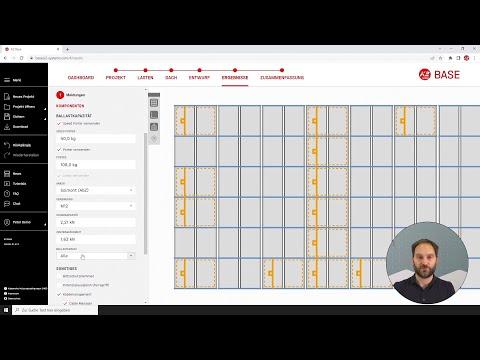
Generates project-specific structural analysis showing the stability and utilization of the proposed mounting system. For flat roofs, it can determine the required ballast to resist wind loads.
Bill of Materials
Automatically creates an editable list of the required K2 components, including rails, roof hooks, clamps, connectors, fasteners, and ballast elements.
K2+ Interface
Transfers project information to compatible electrical design and inverter planning applications, reducing duplicate data entry between structural and electrical workflows.
Multi-Language Support
Provides localized interfaces, calculation rules, and regional standards for multiple markets, making it suitable for international solar companies.
Screenshots




KBase Pricing
KBase is provided by K2 Systems as a free online service for its customers and professional partners.
Free Access
There is no subscription fee or upfront software cost. Users need to create a free MyK2 account to save, edit, and manage projects.
Demo and Training
Tutorial videos, webinars, documentation, and other training materials are available to help users learn the platform before creating their first complete project.
No Usage-Based Fees
There are no publicly listed per-project charges or usage fees based on system size, project volume, or design complexity.
K2 Hardware Requirement
Although the software is free, it is intended to support projects that use K2 Systems mounting hardware. The platform’s component selection and calculations are based on K2 products.
KBase Integrations
KBase includes integrations through the K2+ interface to connect structural planning with inverter selection, electrical design, engineering, and project documentation.
Inverter and Electrical Design Integrations
- SolarEdge
- SMA
- Fronius
- Kostal
- GoodWe
- Archelios Pro
- PV*SOL Premium
Engineering and Permitting
- GreenLancer: Supports the transfer of project information for solar engineering and permitting services.
K2 Systems Applications
- K2 DocuApp: Supports project documentation and digital signing workflows.
- K2 CheckApp: Allows users to capture project information on mobile devices during the survey and bidding stages.
How to Set Up KBase
- Visit the K2 Systems digital services page and open the KBase login.
- Create a free MyK2 account using your professional email address.
- Sign in and configure your user profile, preferred units, language, and regional standards.
- Create a new project and enter its address to open the Google Maps satellite view.
- Define the roof type, dimensions, pitch, covering, and structural parameters.
- Select the photovoltaic modules from the integrated component database.
- Follow the guided workflow to complete the mounting design and generate the results.
How to Use KBase
1. Create the Project
Enter the project and customer information and use the Google Maps interface to locate the building.
2. Define the Roof
Draw the roof geometry, specify its pitch and dimensions, and mark obstructions such as chimneys, skylights, vents, and restricted areas.
3. Select the PV Modules
Choose the required photovoltaic module from the integrated database, which contains more than 150,000 product entries.
4. Select the Mounting System
KBase recommends a compatible K2 mounting solution, such as SingleRail or Dome 6, based on the roof type and project parameters.
5. Create the Module Fields
Position the required module fields on the roof. The software calculates the mounting layout, rail placement, attachment points, and other structural requirements.
6. Review the Structural Results
Review structural utilization, wind and snow loads, fastener requirements, and any ballast required for flat-roof systems.
7. Export the Project
Generate a PDF report, assembly plan, ballast plan, and bill of materials for procurement and installation.
What You Can Manage with KBase
- Project Portfolios: Organize and filter current, planned, and completed solar projects from a centralized dashboard.
- Structural Reports: Produce PDF documents containing verifiable static calculations for engineers and building authorities.
- Bills of Materials: Create and edit lists of K2 mounting components for purchasing and distribution.
- Assembly Plans: Generate visual installation drawings for teams working on the roof.
- Ballast Plans: Calculate and visualize weight distribution for flat-roof systems.
- Data Exports: Transfer project information to compatible electrical design, engineering, spreadsheet, and CAD applications.
KBase FAQs
What does KBase do?
KBase is a web-based tool for planning photovoltaic mounting systems. It allows installers to create roof layouts, calculate wind and snow loads, verify structural stability, and generate a complete list of K2 components required for installation.
Who is KBase best for?
KBase is best suited to photovoltaic installers, project planners, and engineers who use K2 Systems mounting hardware. It is particularly useful for teams that need to comply with structural standards such as the Eurocode.
Is KBase free?
Yes. KBase is a free service provided by K2 Systems. Users must register for a MyK2 account to save and manage their projects, but there are no standard subscription or per-project fees.
How much does KBase cost?
KBase does not have a separate software license cost. However, the resulting designs use K2 Systems mounting components, which must be purchased through K2 or an authorized distributor.
What are the main limitations of KBase?
The main limitation is that KBase only supports K2 Systems mounting hardware. It also focuses on structural mounting design and does not provide the same level of electrical, production, or financial analysis as comprehensive solar design platforms.
What are the best alternatives to KBase?
Common alternatives include Schletter Configurator and Esdec Calculator for manufacturer-specific mounting system design. OpenSolar, Aurora Solar, and HelioScope provide broader solar design functionality that includes electrical and energy production analysis.