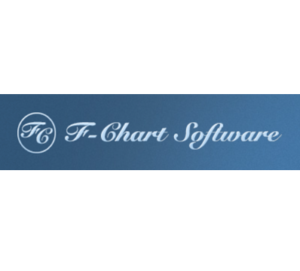
Fronius Solar.web1 / 6

Fronius Solar.web

by Fronius · est. 1945

Free cloud monitoring from Fronius for its own inverters, meters and batteries: live energy flow, history and remote diagnostics for owners and installers.

Starting price
Free
Free trial
Free plan
Best for
Fronius system owners and installers

Pros and Cons

Pros

  • Fault notifications, automatic reports and remote inverter updates are included in the free tier.
  • Remote diagnostics reduce service visits.
  • With a battery and a dynamic tariff, the Premium Energy Cost Assistant charges from the grid when power is cheap and feeds in when feed-in rates are high.
  • In the US, installers can change GEN24 DER settings remotely and download the EPRI CFF configuration report used for interconnection approval.

Cons

  • Works only with Fronius inverters, so mixed-brand fleets need a separate tool for the other brands.
  • The full data archive, PV profitability, the yield and cost overview and on-demand reports require Premium.
  • Requires stable internet connectivity for cloud monitoring.
  • Consumption charts need a Fronius Smart Meter, and so do the Premium profitability and cost views.
  • Flexible-tariff support, which price-based battery optimization depends on, is offered only in selected European countries, including the UK, and not in the US or Australia.

Fronius Solar.web is the monitoring portal and app Fronius has offered for its own inverters since 2010. A PV system can only be added through a Fronius inverter, so Solar.web is the default tool for Fronius owners and installers and of no use for other inverter brands or mixed-brand fleets.

Owners use it to check production, self-consumption and savings; installers use the web portal to watch their whole fleet and deal with faults remotely. Basic monitoring is free. PV forecasts and battery cost optimization are paid Premium extras, which Fronius sells only in selected countries.

What Is Fronius Solar.web?

Fronius Solar.web is a cloud-based solar monitoring and analytics platform built specifically for Fronius solar inverters, smart meters, batteries, and EV charging products.

It is the monitoring layer of the Fronius “24 Hours of Sun” ecosystem: the inverter's datalogger sends data to the cloud, and owners and installers view it in a browser or the mobile app. Access is split into three roles: Owner, Supervisor and read-only Guest.

Features

  • Real-Time Energy Flow: Monitor live solar production, battery storage, grid usage, and home consumption.
  • Yield and Consumption Analysis: Analyze production and consumption trends using daily, monthly, and yearly charts.
  • Multi-System Management: Manage entire portfolios of solar systems from one installer account.
  • Automatic Alerts: Receive notifications for inverter faults or system errors.
  • Energy Cost Assistant (ECA): Plans battery charging and discharging around expected PV yield, consumption, electricity prices and feed-in tariffs, and shows the plan for the next day; Fronius describes it as AI-based (Premium only; requires a GEN24 Plus or Verto Plus inverter with a compatible battery and a dynamic tariff or feed-in limit).
  • Weather and Yield Forecasting: Two-day PV yield forecast (for one system per account) and seven-day weather forecast, both Premium.
  • Remote Configuration: Update firmware remotely; on GEN24, Tauro and Verto inverters (firmware 1.34+), owners and supervisors can also change device settings, and owners can switch remote configuration off.
  • Simulation Tools: Installer add-on simulations show whether a battery or an Ohmpilot would pay off for a customer.

Fronius Solar.web Pricing

Monitoring is free; Fronius charges for Premium analytics and for API access, and publishes no global price list.

  • Basic Version: Free monitoring for registered Fronius hardware.
  • Solar.web Premium: Paid subscription for advanced analytics and forecasting tools, available in selected countries in 3-month, 1-year or 3-year terms after a free trial.
  • Query API: Separate pay-per-use REST API for business customers, billed by data points per month, for custom integrations and data exports.
  • Warranty Benefits: Registering the inverter gives a free warranty extension in countries where Fronius offers one; paid extensions are available only for SnapINverters, up to 20 years in total.

Integrations

Third-party software has two routes to the data: the Solar.web Query API in the cloud, or the inverter's local interfaces, the Fronius Solar API (JSON) and Modbus TCP/RTU, which work without Solar.web.

  • Fronius Hardware: SnapINverters, GEN24 and GEN24 Plus, Tauro, Verto and Argeno inverters, Smart Meters, Ohmpilot, and Wattpilot EV chargers.
  • REST API: Export data to external dashboards and management platforms.
  • Mobile Apps: iOS and Android apps; some Premium functions, such as activating the Energy Cost Assistant, are only in the web version.

How to Set Up Fronius Solar.web

  1. Install the Fronius inverter and connect it to the internet.
  2. Create a Fronius Solar.web account.
  3. Add the PV system in Solar.web or the Fronius Solar.start app using the inverter's Datalogger ID (GEN24, Tauro, Verto and Argeno inverters use the V.Code from the rating plate).
  4. Add Fronius Smart Meters for consumption tracking.
  5. Configure energy tariffs and location settings.
  6. Select either the Basic or Premium monitoring plan.

How to Use Fronius Solar.web

For owners, the energy-flow view shows where PV power is going right now, and the daily charts show when it makes sense to run large loads such as a heat pump. With a GEN24 Plus or Verto Plus, a DC-coupled battery and a Smart Meter, one tap in the app charges the battery to full and holds it for 24 hours as a backup reserve, with no Premium needed.

Installers work mainly in the web portal: all customer systems and their fault messages are in one list, and with Owner or Supervisor rights they can update firmware and, on newer inverters, adjust settings remotely.

What You Can Manage with Fronius Solar.web

  • PV System Performance: Track inverter and MPP tracker output.
  • Energy Consumption: Monitor household and facility usage patterns.
  • Battery Storage: Optimize charging and discharge cycles.
  • EV Charging: See Wattpilot charging data when the charger is paired with a GEN24 or Tauro inverter in the same PV system; charging settings stay in the Solar.wattpilot app.
  • Financial Reporting: Analyze savings, exports, and electricity costs.
  • Service and Maintenance: Access logs, alerts, and remote updates.

FAQs

What does Fronius Solar.web do?

It collects data from a Fronius inverter and any connected Fronius Smart Meter, battery or Wattpilot charger, and shows live energy flow, production and consumption history and fault messages in a web portal and mobile app. Installers also use it to update inverters and, on newer models, change their settings remotely.

Who is Fronius Solar.web best for?

It suits homeowners and businesses with a Fronius inverter, and installers who look after many Fronius systems. It is not an option for other inverter brands or for mixed-brand fleets.

Is Fronius Solar.web free?

Yes. The Basic version is free; Premium, sold in selected countries after a free trial, adds PV forecasts, the full data archive, profitability views and the Energy Cost Assistant.

What are the main limitations?

It works only with Fronius inverters, consumption and cost data need a Fronius Smart Meter, the forecasting and optimization tools are Premium-only and not offered in every country, and the system needs a reliable internet connection.

What are the best alternatives?

SolarEdge Monitoring and Enphase Enlighten do the same job for their own hardware, so they are alternatives only while you are still choosing an inverter brand. For brand-neutral monitoring, Solar Analytics is an option.

Fronius Solar.web alternatives

  • PV F-CHART

    by F-Chart Software

    Photovoltaic system analysis software that estimates monthly performance and economics using utilizability methods developed at the University of Wisconsin.
    $400 / one-timeFree trial
    Review
  • PlantPredict

    by Terabase Energy

    Cloud-based energy simulation software for utility-scale PV plants, originally created by First Solar and now part of Terabase Energy.

    $150 / monthFree plan
    Review
  • Enurgen DUET

    by Enurgen

    Physics-based energy yield modeling platform for utility-scale solar plants, using 3D finite element modeling for design validation and operations.


    On request
    Review